Beginner’s Guide to ALE and IDocs – Part II

In the previous part we created an IDoc structure which can carry our data from source system to target system(s). In this part we will understand how to setup the source system to be able to generate and send an outbound IDoc.

Outbound Settings

Define Logical Systems and Assign Client to Logical System – Transaction SALE
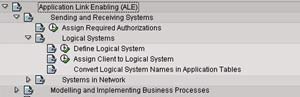
Transaction SALE

  • Go to Define Logical System (See the figure)
  • Define a new logical system to identify the local system and save it
  • Now, go to Assign Client to Logical System (See the figure)
  • Add a new entry
  • Specify the client, previously created logical system and other attributes
  • Save the entry
  • Define a new logical system to identify the partner system and save it

Maintain RFC Destinations – Transaction SM59

  • Create a new RFC destination for R/3 type connection
  • Specify the target host on Technical settings tab
  • Provide the Logon credentials on the Logon/Security tab
  • Save the settings
  • To verify the settings, Click on Test connection or Remote logon

Define Ports – Transaction WE21

  • We need to define a tRFC port for the partner system
  • Click on Transactional RFC node
  • Create a new port
  • Provide a description
  • Specify the name of the target RFC destination
  • Save the object

Maintain Distribution Model – Transaction BD64

  • Click on Change
  • Create a new model view
  • Provide a Short text and Technical name to the model view
  • Add message type
  • Specify sender and receiver systems
  • Also, specify the message type that we created previously
  • Save the Distribution model

Generate/Create Partner Profile – Transactions BD82/WE20
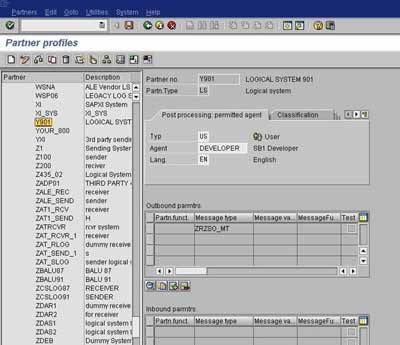
Transaction WE20

  • To generate Partner profiles automatically you may use BD82 or go to BD64 and use the menu path Environment -> Generate partner profiles
    • Otherwise, you may use transaction WE20 to create a partner profile
  • On selection screen, specify the model view, target system and execute
  • The result log will be displayed on the next screen
  • To verify the partner profile go to WE20
  • Check the partner profile for the target system

Distribute Model View – Transaction BD64

  • Select the Model View
  • Go to menu path Edit -> Model View -> Distribute
  • Result log will be displayed on the next screen

Outbound IDoc Generation Program

Create an executable program ZRZ_ORDER_IDOC in SE38. Below, I have described the program logic:

  • Fetch the data from the DDic tables ZCUSTOMERS, ZSOHEADERS and ZSOITEMS as per the selection criteria
  • Fill the control record structure of type EDIDC
    • Specify message type, Basic IDoc type, tRFC Port, Partner number and Partner type of the receiver
  • Fill the data records
    • Define structures like the IDoc segments
    • Fill the structures with fetched data
    • Pass the segment name and the above structure to the appropriate fields of EDIDD type structure
    • Append the EDIDD structure to the EDIDD type internal table
  • Now, call the function module MASTER_IDOC_DISTRIBUTE and pass the IDoc control record structure and data record table
  • Commit work if return code is zero
  • Function module returns a table of type EDIDC to provide the details about generated IDoc
  • Display appropriate log

You can download sample code for the above program here.

Thus we have completed sender side configuration required for ALE. In the next part we will see how to configure the receiving system to be able to receive and post the inbound IDoc.

This entry was posted in SAP, SAP ABAP and tagged , , , . Bookmark the permalink. Post a comment or leave a trackback: Trackback URL.
Around the Web »»

48 Comments

  1. toufeeq
    Posted June 11, 2008 at 7:29 pm | Permalink

    hi riyaz,

    i want to learn sap-xi , could you please provide any begginers guide of SAP-XI

    i would be very thank ful for your help

    Thanks in anticipation
    Toufeeq

  2. Posted June 12, 2008 at 9:23 am | Permalink

    Do read Your First XI Scenario. This will help you to understand XI basics.

    You can also go through other articles in SAP XI category. You will find a number of different scenarios.

  3. Senthil
    Posted August 1, 2008 at 2:30 pm | Permalink

    Hi Riyaz,

    Good efffort..keep it up..I am a certified SAP Xi consultant..and found ur step by step approach indeed informative.

    Thanks,
    Senthil

  4. Posted August 1, 2008 at 2:42 pm | Permalink

    Many thanks Senthil for your compliments.

    Regards,
    Riyaz

  5. Nandan
    Posted August 13, 2008 at 5:33 pm | Permalink

    Hi Riyaz,
    I need to understand how do we Trigger IDOCS for e.g if we have any idocs related to FINANCE how do we trigger the IDOCS and map the required data and post in R3 incase of INBOUND Idocs.

    GL Posting issue how to achieve this using IDOCs[Inbound] ?

    Thanks
    Nandan

  6. Amish
    Posted October 7, 2008 at 2:50 pm | Permalink

    Hi ,

    I just want to know that what do we define in message types ane wht do we basically need that.

    Thanks and Regards,
    Amish.

  7. Posted October 8, 2008 at 10:02 am | Permalink

    Hi Amish,

    Every IDoc is made up of a basic type and a message type. e.g. in case of Purchasing/Sales order IDoc, ORDERS05 is the basic type and ORDERS is the logical message type. For details on how to define these, please check out the first part of this article series.

    Regards,
    Riyaz

  8. sai
    Posted October 23, 2008 at 8:10 am | Permalink

    Hi riyaz,
    I’m new to sap and i found your blog really helpful.Good work..Thanks .
    Since im in training period (I use IDESS)there is no authorization for RFC destination(SM59).Is there any other way to go ahead?? And I’m confused with Inbound and outbound concepts can you explain it in detail (Could you pls explain how to configure sending and receiving port).I appreciate your help
    Thanks
    Sai

  9. Posted October 23, 2008 at 3:56 pm | Permalink

    Hi Sai,

    Please request your Basis administrator to provide you authorization to access transaction SM59. You need to configure ports so that one system can access the other. Ports are nothing but the configuration settings which define the RFC connection which should be used to connect to the partner system. Outbound means messages being sent out from the source system while inbound refers to the messages coming in or being received in to the target system.

    Hope this helps.

    Regards,
    Riyaz

  10. sai
    Posted October 24, 2008 at 7:06 am | Permalink

    Thank you very much for your replies ..it really helped me to understand the basic process and I appreciate ur help.In transaction BD64 what is the use of ADD BAPI icon.How BAPI is related to IDOC.And difference between BAPI and RFC.
    If possible could you post something on USER-EXITS and BAPI’S too .
    Thanks & Regards
    Sai

  11. Abdur rasheed
    Posted November 4, 2008 at 4:03 pm | Permalink

    Hi Riyaz,

    Thanx for providing such a nice document.

    I m new to ALE IDOC.I have few questions.

    I want to send IDOC from WCD300 to WCD320 client.
    So, I created two partner profile WCD300 and WCD320 in WCD300 client.
    this profiles also have outbound parameters which gives information about port and RFC destination.

    Now my question is WHICH PROFILE OUTBOUND PARAMETERS IS USED BY MASTER_IDOC_DISTRIBUTE in order to get information abt port and rfc dest?

  12. Posted November 4, 2008 at 5:08 pm | Permalink

    A system always uses the partner profile of the partner it communicates with. So source system refers the target by the target’s partner profile created in source system. Similarly, target system refers the source by the source’s partner profile created in target system.

    In short, partner profile is meant to indentify the system we are communicating with.

  13. majed khan
    Posted December 1, 2008 at 6:56 pm | Permalink

    ASK Riyaz,

    Its really very good site .. good work keep it up.
    i am new to Idoc can you send me detail of it.
    any website or ppt which will help to learn idoc initilly.

  14. Posted December 2, 2008 at 11:24 am | Permalink

    You may want to go thru the first part of this article series. It explains the basics and structure of IDoc.

  15. Cesar
    Posted February 11, 2009 at 1:34 am | Permalink

    Hi Riyaz,

    Its a nice document.

    Your manual helped me to set the message type INVOICE but when generating the message of the invoice in VF02, the message is not processed is in yellow. And when you double-click the message I get the indication that -No communicatin data has been defined for transmission medium 6-.

    May help correct this problem. Thank you very much

  16. Posted February 11, 2009 at 10:04 pm | Permalink

    Hi,

    See if this helps

    Configure the output type for transmission medium 6. Go to Maintain Output Types in the IMG for whatever type of document you are trying get output for. Select the output type and then double click on the processing routines folder. Create an entry here for medium 6.

  17. balouz
    Posted June 3, 2009 at 7:20 pm | Permalink

    Hi Riyaz,
    Thinks for you superb site.
    Iam facing a problem using we64. when i tried to distribut the model view , i get a meesage error .Reason : distribution model is currently being processed .
    Do you have any idea of what is means?
    Thinks a lot for your help
    Balouz

  18. Posted June 3, 2009 at 7:48 pm | Permalink

    Try closing any open sessions and try again. I guess this should help.

  19. balouz
    Posted June 3, 2009 at 9:51 pm | Permalink

    I think i find why: i specified in sm59 (target) the piuser with the Saa All because i had a authorisation (unsolved) probleme with the user PIAPPLUSER. no RFC role

  20. Shamim Khan
    Posted June 17, 2009 at 2:56 pm | Permalink

    Hi Riyaz,

    This document was really helpful in understanding the ALE and Idoc concept.

    However, I’ve a question for you: Our requirement is to move data from ECC to CRM system. We thought of using RFC adapter but due to some concerns, we could not implement and finally we’ve decided to use proxy to integrate ECC and CRM systems. I’ve no idea about Proxy (this is the first i’m going to work on integration part). Can you please tell me what is a proxy and how we can use proxy in integrating these two systems and be successfull in moving data from ECC to CRM system?

    Thanks in advance, Shamim.

  21. Posted June 17, 2009 at 3:20 pm | Permalink

    Hi Shamim,

    Proxies are used where we do not have appropriate BAPI function modules. Proxies are advantageous over RFCs in many ways. They are flexible and speed up the implementation. Have a look at this link for more info. For proxy based scenarios following links may be useful: ABAP client proxies, ABAP server proxies.

    Regards,
    Riyaz

  22. Shamim Khan
    Posted June 17, 2009 at 4:06 pm | Permalink

    thanks a lot Riyaz. Your’re really helping everyone to move on when ever they’re stuck somwhere in their work. Only, they have to come here and ask you ;)

    I’m even impressed with your speedy reply too.

    Will sure be back if i’ve any further questions.

    thanks again.
    Shamim

  23. Subodh B.
    Posted August 3, 2009 at 2:08 pm | Permalink

    Dear Riyaz,

    Could you please send me some more elaborated document on basics and need ALE and IDOC in step by step approach.

    Thanks in anticipation……..
    S.

  24. muthu
    Posted September 24, 2009 at 2:39 pm | Permalink

    hi riyaz,
    in bd64 i am getting error :
    “Rreason: Distribution model is currently being processed bd64 error”. I tried
    closing the sessions and all. even after couple of days also i am gettng this error.
    This error is suddenly coming when i tried deleting the existing model and tried recreating it.
    kindly tell me the solutions if any.

    Thanks in advance.
    Muthu

  25. Posted September 24, 2009 at 2:56 pm | Permalink

    Check if there are any locks in source and all target systems via SM12 transaction. Otherwise you can create a new model with a new name. If only two systems are involved, you can even create partner profiles manually on each system.

  26. Tiago Magalhães
    Posted October 1, 2009 at 5:07 am | Permalink

    The best post I have ever seen. Many thanks.

  27. Malu mader
    Posted December 4, 2009 at 6:25 pm | Permalink

    Hi Riyaz

    Thank you for the good work

    I have one complex scenario I want to ask your opinion about , is it possible to atache a file with a description.

    Thanks.

  28. vedthakur
    Posted December 12, 2009 at 1:52 pm | Permalink

    Hi riyaz,

    Thanks for this information.

    i am completely new to ale/idoc and the thing is i am on a project were we have to use an standard idoc and populate data from sap to biztalk server so data will be transferred from sap to non sap and back also so two way what should be the approach

  29. RJ
    Posted December 27, 2009 at 12:44 pm | Permalink

    Hi Riyaz

    Thanks for clearing my doubts on Logical system. i am new to ALE config

    I have one more problem on Partner profile

    I have two system System A client (100) and System B clint(200)

    System A is Sender and System B is Reciver. I did following settings in my system as per your last post

    I Defined Logical System in System A(100) as

    LS_A and i assigned the LS_A to client 100
    LS_B (No assignement)

    I Defined Logical System in System B(200) as

    LS_B and i assigned the LS_B to client 100

    LS_A (no assignement)

    Now In system A i genrated the Partner profile ( BD64)

    So Two Partner profile LS_ A and LS_B is get genrated

    Now here is my problem:

    I assigned the Outbound Message Parameters in partner profile LS_B in System A

    And In System B , In which Partner profile i need to assign the Inbound Message Parameters to

    Partner profile LS_A or LS_B?

    Please help.

    Thanks in Advance
    RJ

  30. RJ
    Posted December 27, 2009 at 12:56 pm | Permalink

    Hi Riyaz

    In another scenario i have to connect System A(100) to another system Z(500).

    Where system Z is sending and system A is Receving.
    Now i have already Logical system defined in System A for Idoc transfer to System B. So in in ALE side for getting connected with System Z do i need to create the Logical system again in system A?

    If yes then how could we assign the same client to two different Logical system
    in client assignment part?

    Regards
    RJ

  31. Posted December 29, 2009 at 12:26 pm | Permalink

    Look at two systems in a broader sense. Say System A belongs to your organization and System B belongs to a rtade partner organization (say a customer or a supplier). So message that goes out from System A to System B, would be defined in the partner’s profile for System B (which is ofcourse defined in System A). Since the message goes out, define it in Outbound parameters. Similarly, System B receives the message from System A. For System B, System A acts as a partner. So define a partner profile for System A in System B. And since the message is incoming to System B, define it in the Inbound parameters.

    For the second question: Whenever you add an ALE partner, you need to add a logical system. You dont have to do client assignment for the partner system. Client assignment is only for your own system i.e. System A in your case. You already have a client assigned to System A. To receive from System Z, define a partner profile for System Z in System A in the Inbound parameters.

    Hope this answers your query.

  32. ved thakur
    Posted December 29, 2009 at 5:29 pm | Permalink

    Hi riyaz,
    Help me over this issue.
    I have creted One idoc (CUSTOMISED ONE)
    HAVING TWO SEGMENTS
    first segment containing fields from T005 table (country)
    second segment containing fields from T005U table(state) and is child of Country table.

    i have maintained this relation in IDOC also
    scenario is i have to pass the data to this IDOC
    please guide me how to do this and what are the steps for this as i have to transfer data from sap and then the through .net connector it will be picked by Ivend guys.

    pls help

  33. Posted December 30, 2009 at 11:13 am | Permalink

    This article describes the very process of generating and sending a custom IDoc. See the ‘Outbound IDoc Generation Program’ section for a sample ABAP code for IDoc generation.

  34. satya
    Posted January 7, 2010 at 2:36 pm | Permalink

    Hi riyaz,
    Help me over this issue.
    we have a client 900(ec5.0) and 910(ehp4) .
    based on my business requirement :
    settings are re-configured in 910 same as 900.
    now my requirement is that whatever the transaction made in 900 should
    automatically effect in 910 also. .
    here am bale to send master data using ale -idoc..
    but how to send transactional data .

    all the transaction madin 900 shoule be also in 910.

    thaks.
    Sa.

  35. Tom
    Posted January 13, 2010 at 6:28 am | Permalink

    Hi Riyaz,

    I have only one client access. But I need to practise Idoc. How can we set up the same system (same client) to send and receive the idoc(If possible?)

    Thanks your postings…

  36. Posted January 13, 2010 at 1:56 pm | Permalink

    Generally, ALE is meant for communicating with different SAP systems. You at least need to get another client configured to try out an ALE scenario and comprehend the configuration steps fully.

  37. RJ
    Posted January 15, 2010 at 3:01 pm | Permalink

    Hi Riyaz,

    Can you help me on following.

    I am working on DEBMAS05 Idoc.

    Sender system sending DEBMAS05 Idoc which is an Idoc Extension with two Z segment.

    Now here is my problem.

    In Receving system if i am extending the DEBMAS05 its asking for Access key.Which i don’t want. Is any other alternative of doing this?

    I have two below option but not much clear about it.

    1. If i copy the DEBMAS05 to ZDEBMAS05 and then do idoc extension.In this case do i need to also make ZDEBMAS.

    or i can using DEBMAS as Message type for ZDEBMAS05?

    2. I found one function-exit ‘EXIT_SAPLVV02_001′ in (user-exit VSV00001) which has description ‘Read and Post Additional Export Customer Master Segments’.

    can i use above function-exit in DEBMAS05 without extending the Idoc for Z fields in reciver side.

    i am just evaluating above option so that i do not use Access Key.If above option is not valid then i may use Access Key,

    Please suggest.

    Regards
    RJ

  38. Umar
    Posted March 8, 2010 at 7:05 pm | Permalink

    Hi riyaz,

    Thank you sharing very useful tutorial.
    As my SAP is not advanced,I like to ask few question.

    The table you had given in the beginning of the tutorial,I had created in the SAP and code sucessfully compiled.The problem, I am facing it that it not accept any S_kunnr if selected among the list.

    Therefore,I like to ask the tables you have provided in the beginning are the reference tables or they are new(examplary) tables.(Getting an Error:No customers Found).

    Please suggest to get rid out of this problem.
    Your early reply is requested.
    Regards
    Umar

  39. Posted March 9, 2010 at 3:49 pm | Permalink

    The tables are custom tables (starting with Z) and not SAP provided standard tables. You can see the previous part where I have shown the table structure: http://www.riyaz.net/blog/beginners-guide-to-ale-and-idocs-a-step-by-step-approach/

  40. ulhas
    Posted April 2, 2010 at 12:06 pm | Permalink

    Subject : Sales Scheduling Agreement (VA31) through IDOC

    We are trying to map a proceee based on Incoming IDOC converted to Sales SLA.The problme we are facing is we are not abe to find perticular IDOC configuration for SLA.

    We are trying to use message ORDERS for the same but are facing problme with screen sequence.

    Please let us know how can be mapped and do we have dedicated standard IDOC configuraion for SLA.

    Thanks

    Ulhas

  41. mohit verma
    Posted April 15, 2010 at 6:47 pm | Permalink

    Hi Riyaz,
    I have 2 cross clint 200 and 500 on our dev server.

    I am doing customized idoc sending using your article

    Beginner’s Guide to ALE and IDocs – Part I
    Beginner’s Guide to ALE and IDocs – Part II
    Beginner’s Guide to ALE and IDocs – Part IIi

    on clint 500(receiver) my idoc are in
    Status 64 IDoc ready to be transferred to application
    No filters , No conversion , No version change .
    kindly help me

  42. Posted April 16, 2010 at 10:55 am | Permalink

    You may want to try BD87 to push the IDocs. There are no errors in your IDocs.

  43. tausif
    Posted April 30, 2010 at 5:11 pm | Permalink

    ASK Riyaz bhai
    U r doing very good job .
    i m working on abap n i m interested in learning XI/PI ,idoc .
    so keep updating us with ur ausome knowledge

    thanks
    tausif

  44. Janine
    Posted July 9, 2010 at 12:45 pm | Permalink

    Thanks for the very informative site! I am currently having problems in sending an IDOC from R/3 system to XI. I followed your steps and everything is setup until tcode BD64. when I access this tcode, it returns an error message saying “Local Logical System is not defined”.

    Would appreciate your help. Thanks!

    • Posted July 9, 2010 at 12:51 pm | Permalink

      You need to define a logical system corresponding to the local system using transaction SALE as explained in the beginning of the article.

  45. Santhosh
    Posted August 30, 2010 at 6:30 pm | Permalink

    Hi Riyaz,

    I have datas in an xml file, which i have uploaded to internal table and have all control records, data records details.
    I want to create an inbound idoc with these details.Please suggest me the FM to be used.
    I have one sample pgm frm client using RSEINB00. I am not understanding how it works.Can You suggest any way other than this pgm and also please overview a brief on this pgm.

    • Santhosh
      Posted August 30, 2010 at 7:22 pm | Permalink

      Hi Riyaz,

      The messgae type I use is ZMBGMCR.

      • Posted August 30, 2010 at 9:14 pm | Permalink

        Function module MASTER_IDOC_DISTRIBUTE is generally used to create IDocs. However, when you already have data within your system, you need not create any IDocs. You can directly update the database tables using appropriate function modules locally. Alternatively use the RSEINB00 program.

One Trackback

  1. [...] Home   |    Blog   |    Forums   |    Art Gallery   |    Philately   |    Contact Us    Previous article Next article [...]

Post a Comment

Login with your Facebook or Twitter Account to comment. Alternatively, please fill in the fields marked *.

.

Connect with Facebook

*
*

You may use these HTML tags and attributes: <a href="" title=""> <abbr title=""> <acronym title=""> <b> <blockquote cite=""> <cite> <code> <del datetime=""> <em> <i> <q cite=""> <strike> <strong>

CommentLuv Enabled

Subscribe without commenting

GetSocial