XI/PI: Configuring the Sender Mail Adapter
We have earlier discussed how to configure receiver mail adapter to be able to send emails from SAP XI. In this article, let us understand the configuration of Sender Mail Adapter. Sender Mail Adapter is used to collect emails from an email server and convert them to XML messages so as to process them in XI Integration Engine.
Configuring the Sender Mail Adapter
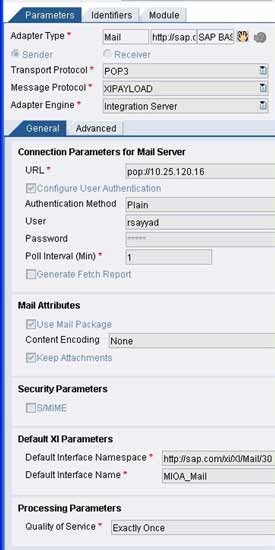
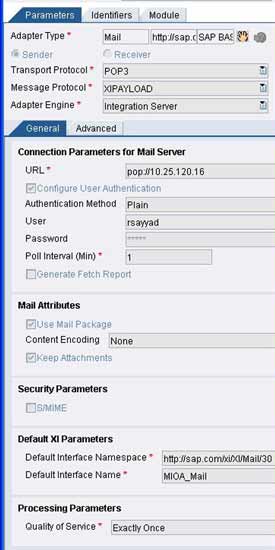
The adapter supports POP3 as well as IMAP4 protocols. You need to specify the connection parameters for the mail server. Specify the Mail server URLs depending upon the transport protocol (POP2 or IMPA4) in the format given below:
pop://EmailServer or imap://EmailServer/UserInbox
Select the ‘Use Mail package’ indicator if you want to receive the email along with header information (like sender, receiver, subject etc) as payload. If you don’t check this box, you will only receive email content as your payload. You can specify the content encoding as required. If you do not choose any, the message will be transferred as it is.
If you want to preserve the attachments, select the ‘Keep Attachments’ checkbox. All the three Quality of Service (BE, EO, EOIO) are supported. Specify QoS as per your scenario. Provide the name and namespace of the outbound interface from Integration Repository that should handle the further processing of the converted XML message and you are done.
Specify the poll interval i.e. the time interval between two attempts by XI to check for any new messages. Once active, the adapter will start polling the Email Server. The adjoining figure shows a typical configuration of Sender Mail Adapter.
Say your email inbox receives an email shown below.
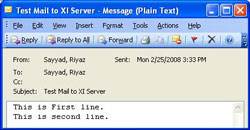
Once XI polls the server, the email will be picked up and processed by the adapter engine. The figure below shows the resulting XML payload after processing by the adapter engine.
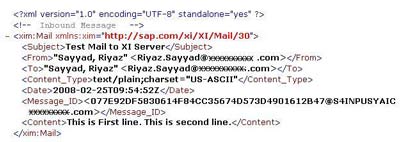
Thus, we are done with configuration of sender mail adapter. If the email is received in rich-text or HTML format the same is sent in the form of a SOAP attachment along with the message payload. We can see this using transaction SXMB_MONI or SXI_MONITOR.
Also Read:


Kamal says:
March 14th, 2008 at 1:36 pm
Hi ,
it is excellent stuff , i have configured the sender adapter as you shown above but i am getting the error “exception caught during processing mail message; java.net.ConnectException: Connection timed out: connect” in the sender adapter.
In Aunthentication Method i have given as my maild and password , is it correct?
Can you please tell what should be done
Thanks and Rgds,
Kamal
Riyaz says:
March 15th, 2008 at 1:09 pm
Hi Kamal,
Thanks for the compliments.
To resolve this error, make sure that your email server is accessible and supports pop access and that you are using the correct URL. You can confirm the URL from your outlook properties or whichever email client you are using. If the URL has hostname in it, try by replacing the hostname with its corresponding IP address. You can ping the server hostname using command prompt to find its IP address.
Also, if you are using Mail Package, you must use the namespace http://sap.com/xi/XI/Mail/30. If its not available, you can download it from SAP service marketplace or manually create one.
Let me know if this helps.
Regards,
Riyaz
Kamal says:
March 17th, 2008 at 3:00 pm
Hi Riyaz,
Thanks for your Valuable Comments, I have implement the same it is working fine for me , i need to Read an attachment from the mail, now i am able to get a mail , in SXMB Moni i am getting the Payload with attachment(PDF), I have a create a module to convert that PDF to XML(Module is working fine in file to file sceneraio) . My doubt is should i need to use Payload Swap Bean Module also , because in sap help said i Select Keep Attachments, we need to use that one.
Can you please tell me how to proceed futher
Kamal says:
March 17th, 2008 at 3:00 pm
Hi Riyaz,
Thanks for your Valuable Comments, I have implement the same it is working fine for me , i need to Read an attachment from the mail, now i am able to get a mail , in SXMB Moni i am getting the Payload with attachment(PDF), I have a create a module to convert that PDF to XML(Module is working fine in file to file sceneraio) . My doubt is should i need to use Payload Swap Bean Module also , because in sap help said i Select Keep Attachments, we need to use that one.
Can you please tell me how to proceed futher
Thanks
Kamal
Riyaz says:
March 17th, 2008 at 3:47 pm
Hi Kamal,
I havent personally worked on adapter modules. However, if I find some useful information, I will pass it on to you.
Regards,
Riyaz
Ravi.S says:
July 3rd, 2008 at 3:55 pm
Hi Friend,
doubt in file to rfc to mail scenario .can you please send any screen shot for this requirement.
Regards,
Ravi.S
Riyaz says:
July 3rd, 2008 at 4:21 pm
Hi,
For RFC Sender Adapter - see this - http://www.riyaz.net/?p=42
For Mail Receiver Adapter - see this - http://www.riyaz.net/?p=83
Regards,
Riyaz
Ravi.S says:
July 4th, 2008 at 11:11 am
Hi Riyaz,
Thanks for the help.One small doubt after getting File Responce from xi server iam connceting mail adapter.
Step 1 : send is file adapter (File Request)
step 2 : receiver is RFC (Bapi fm in R/3 side)
step 3 : after creating saleorder iam getting information from xi through File Responce.
Doubt : after getting responce from xi
sender is file responce file adaptre
receiver is mail adapter right ?
Regards,
Ravi.S
Riyaz says:
July 4th, 2008 at 3:05 pm
Hi Ravi,
If you want to use a BAPI/RFC at the receiver side, you will require an RFC receiver adapter and not the mail adapter. See for details.
Regards,
Riyaz
Leela says:
July 4th, 2008 at 6:16 pm
Dear Riyaz,
I am having one doubt. Could u please help me in this issue.
In a file to file scenario, the input file will be picked from a directory location and after processing output file will be placed in the output directory location specified in the receiver communication channel.
In the sender communication channel for the scenario mentioned above, if the processing mode is given as delete, the input file will be delete as soon as the file was successfully read by the adapter, but this will not ensure that the file processing is complete and the output file is being created.
If we have a scenario in such as way that the input file should be deleted from the input folder only if the complete process is successful and the output is generated. how can we achieve this functionality?. send me your reply as soon as possible.
Riyaz says:
July 7th, 2008 at 9:26 am
Leela,
This option is currently not supported by XI. No idea if it will be supported in future releases or not. This is because if the polling interval is shorter than the time required to process the file completely, there is a possibility of the file being picked up twice leading to duplication errors.
What you can instead do is, set the Processing mode to Archive and specify an Archive directory different from that of the source. So once the file is processed, it will be deleted from source and placed in the Archive directory.
If you do not want to retain the archived files, you can schedule a daily/weekly job to clear the Archive folder (after ensuring that the files in error are not deleted).
Regards,
Riyaz