Do you like my blog? Follow me on Twitter X

XI/PI: File Adapter Configuration

In this article series we will discuss the nitty gritties of the SAP XI File Adapter. First we will understand the File adapter in its most basic form. Then we will have a look at File content conversion with simple and complex file structures.
In this article series we will discuss the nitty gritties of the SAP XI File Adapter. First we will understand the File adapter in its most basic form. Then we will have a look at File content conversion with simple and complex file structures.

File Adapter converts incoming file into XML and vice versa. The adapter resides on the J2EE stack of the XI server. It can read/write files directly from/to the XI server at the OS level using File System protocol. It also works using FTP protocol, using which it can read/write files from/to any server location. Configuration of File Adapter is quite simple and straightforward.

File Sender Adapter

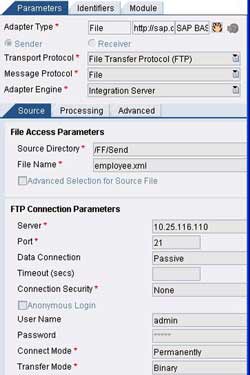
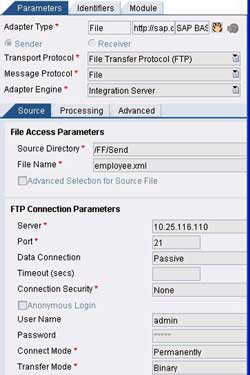
Select the Transport protocol as FTP or NFS and Message Protocol as File. Specify the Directory and filename from where the source file needs to be picked up. File type can be either text (or XML) or binary. In case of FTP protocol, you will need to provide FTP connection parameters as well.
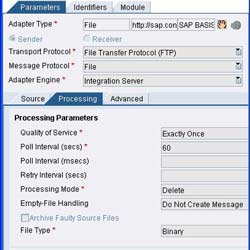
The adapter supports all the three QoS namely BE (Best Effort), EO (Exactly Once) and EOIO (Exactly Once in Order). Specify QoS as per your scenario. Poll Interval indicates the time interval between two consecutive attempts by XI to read the files from source directory. Processing mode defines how the file should be handled once it is processed by the adapter engine. If you specify a queue name (in case of EOIO) it is automatically created in XI.

File Receiver Adapter
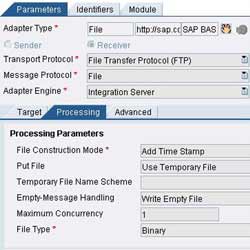
Select the Transport protocol as FTP or NFS and Message Protocol as File. Specify the Directory and filename where the target file is to be put. Target directory if it does not exist gets created automatically. Specify connection parameters in case of FTP protocol. You can specify the File Construction mode as per your choice. QoS possible here are EO and EOIO and is inherited from the Integration Server.

To see an example of file adapter using NFS protocol, go through this article about File to IDoc scenario.

In the next part we shall discuss setting up File Adapter for File Content Conversion with simple structure (CSV File) at sender and receiver end.

Comments

  1. Candy says:

    Hi, Riyaz

    Do you have any sample about using FTPS in file receiver channel or step by step guide? I’m working on this but have not successful, and I’m using PI 7.0 now.

    Could you please give some suggestion,thanks.

  2. merina acharya says:

    Hi Riyaz,

    can you please post aboout the HostFtp adapter configuration.

    Thanks

  3. sreenu says:

    Hi Riyaz,
    i’m not aware coding that much… like java,abap

    is it ok..to learn SAP xi/pi give some guidence…
    i hope i’m waiting for ur reply..

  4. sreenu says:

    Hi Riyaz,
    i’m new in SAP xi/pi how about future and market
    in india how about this

  1. Thirupathi says:

    Hi Riyaz,
    this is thirupathi, how to pick multiple files at a time in different folders? please tell how it is possible

  2. Zia says:

    Hi Riyaz
    Good material for begineer like me to understand step by step.
    Please can u tell me the diffenrence between the sender File Adapter & Sender Soap Adapter.

    Regards,
    Zia

  3. Raghu says:

    Hi Riyaz,
    My name is Raghu. I am new to SAP XI/PI . I found ur site really interesting. Would be great if i could get all the scenario videos for download. So that it would be easy for me to follow the screen etc., pls help me in this matter.
    looking forward to hearing from you.
    regards,
    raghu

  4. Radhika says:

    Hi Riyaz,
    I am doing a simple file to file scenario in PI 7.11.

    The problem I am facing is that the target file is always blank. But when I hard code ( assign constant to target field ) values in source to target mapping, only those fields are seen in the target file. None of the other fields show up. Also I do not see any error in CC or SXMB_MONI.

    Could you please help me out here. Thank you in advance.

    • Riyaz says:

      Please test your operation mapping and interface mapping using the test tab in ESR so that you can identify why the mapping does not work as desired.

  5. Raj says:

    Hi Riyaz, In the Receiver File adapter’s Processing tab, we have “Run Operating System Command before and after Message Processing”. How to use this option? I want to move a file(in folder1) which is sitting in the target system to folder2 in the same target system. This process should happen once my file gets completly downloaded into the folder1. The reason is i’m sending a 40 mb file to target system. I don’t the application which is running in my target system to pick the file from folder which the 40 MB file gets completed dowloaded. This the reason moving the file from folder1 to folder2 so tha that the target application will pick the file from folder2.

    Thanks.

  6. Raj says:

    I’ve a scenerio, where I’ve to pick a simple text file from one server and push into another server. I don’t want any mapping involved in this. This i’m able achieve through File sender and receiver adapter without any mapping involved. But later my requirement grown such that i’ve to pick file(s) from more then one directory path from the sending sending server and send to more than one directory path on the target server. i.e., when i pick a file from say (S:\temp\); i’ve to put this file on target server (T:\temp\). If i pick a file say (S:\temp1) then i’ve to put the file in (T:\temp1) on the target server. Again i can achieve this by creating seperate File receiver adapter. But i’ve 20 such sending and receiving queues on both the servers. Suppose I’ve to change the password of the receiving server. Then i’ve to change all the 20+ FILE Receiver adapter. I can create 100+ receiver adapters but….. Like this i’ve 20+ servers which send and recieve files each other. So imagine…… that is the reason i want to know whether there is R/3 table which updates the all the details which we enter while creating a receiver FILE adapter. It would be easy for me to update the table which in turn will reflect in all corresponding File reciver adapter which i want. My intension is can i change the ip address or userid or password at the SAP table of the corresponsding FILE receiver adapter details.

  7. Can someone tell me how to initiate “namefmt 1″ when using SAP XI/PI Adapters. We don’t want to CHGFTPA to *PATH due to many other FTP process’s that are already in place that assume namefmt 0.

    Thanks,
    Keith

Speak Your Mind

*