We have discussed Simple File Adapter Configuration as well as File Content Conversion for a simple structure CSV file. In this article we will understand how to deal with File Adapter when file structure is a bit complex. For example if it has different number of columns of information on different rows.
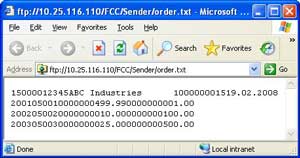
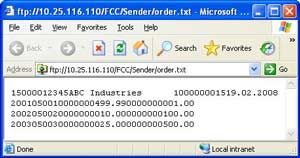 Let us take an example of a simple sales order. Assume that sales order is received in form of a text file. The first row has header information like customer details and order details; whereas the remaining rows have order items details. Every field has different lengths and there are no field separators. The adjoining figure shows such a file with minimal fields.
Sender File Adapter Configuration with Content Conversion
The figure below shows a typical configuration of the sender file adapter. Specify File Content Conversion as message protocol. Document Name and Namespace correspond to the message type from the Integration Repository. Recordset Name defines the root node under which rest of the XML will be created. If left blank, it defaults to ‘Recordset’. If you do not want this extra node to be inserted, you can set the parameter ignoreRecordsetName to true (Thanks Mike for this input). See this link for exhaustive list of available parameters.
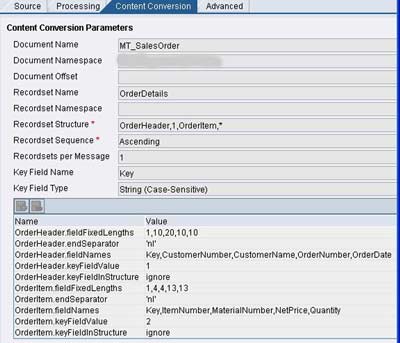
Specify the name and occurrence of each sub-node in Recordset Structure. In this case, OrderHeader node occurs once while OrderItem node can occur any number of times. Key Field Name and Key Field Type help in differentiating different substructures. In this case Key =1 implies OrderHeader node while Key = 2 implies OrderItem node.
Different parameters are given below –
- <node>.fieldFixedLengths – comma-separated ordered list of field lengths in the particular node
- <node>.endSeparator – identifies end of record
- <node>.fieldNames – comma-separated ordered list of field names in the particular node
- <node>.keyFieldValue – Value of the key field
- <node>.keyFieldInStructure – ‘ignore’ (without quotes) indicates that the Key field should not be generated in the resulting XML whereas ‘add’ (without quotes) indicates that it should be added.
For a detailed list of parameters visit this page.
Receiver File Adapter Configuration with Content Conversion
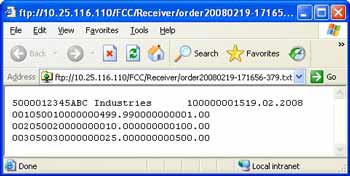 Assume that we want to construct a text file in the similar format from the XML. The generated file should be something like the one shown in the figure on right.
The figure below shows the typical configuration for the receiver file adapter using file content conversion. Specify the comma-separated list of root node and substructures under the Recordset Structure as shown. Then define the parameters as per the requirement.
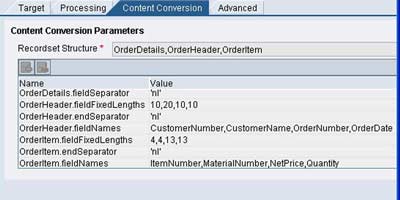
Most common parameters are <node>.fieldSeparator or <node>.fieldFixedLengths, <node>.endSeparator, <node>.fieldNames. For a detailed list of available parameters please refer this page.
Thus we have learned how to configure the SAP XI file adapter on sender and receiver side. We have also covered the File Content Conversion when dealing with simple structures as well as with advanced or complex structures.
