XI/PI: Dealing with Errors on the Outbound side
Sometimes the link between SAP XI and the target system (say ERP) goes down and messages fail on the outbound side. It may not be possible to restart them from using RWB or the transactions like SXI_MONITOR/SXMB_MONI. This article explains how to deal with such messages.
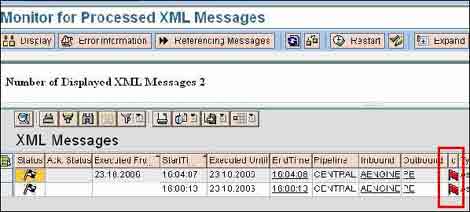
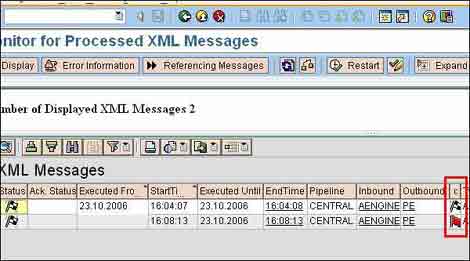
Generally, messages are picked up and sent via SAP XI when the link returns. However, in some scenarios, it may be possible that SAP XI server could not finish conversation with ERP. Main status of messages is “Processed successfully” – but there is an error in the outbound side as shown below. (Transactions - SXI_MONITOR/SXMB_MONI).
These messages do not get picked up automatically – and it is not possible restart them from using RWB or the transactions like SXI_MONITOR/SXMB_MONI.
Such messages could be processed in the following way:
- Send data directly to Integration Engine
- Change the status of failed message
This example shows how to solve the problem – two error messages are shown and one of them is solved here.
Step 1: Send data directly to Integration Engine
Go to Component Monitoring in SAP XI Runtime Workbench. Click on the Test Message tab for the Adapter Engine. Specify the URL of SAP XI Integration engine to send the message to e.g. http://<XIServer>:<J2EE Port>/sap/xi/engine?type=entry
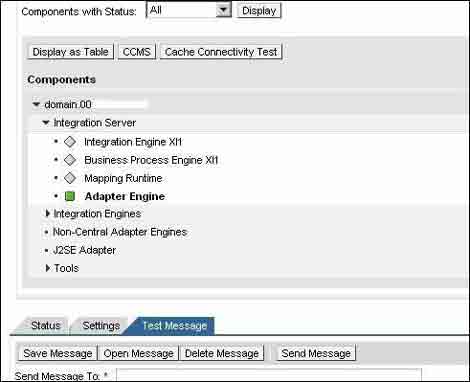
Specify the header Information. Copy payload of the message using SXI_MONITOR/SXMB_MONI and paste it into Payload area in RWB.
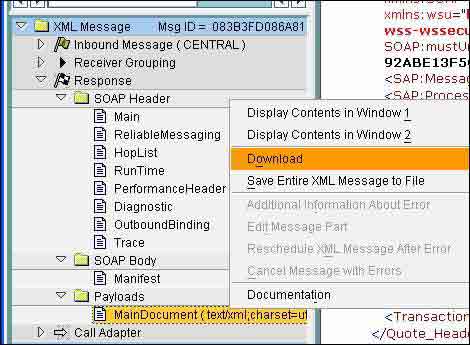
Send the message using Send Message button.
Step 2: Change the status of failed message
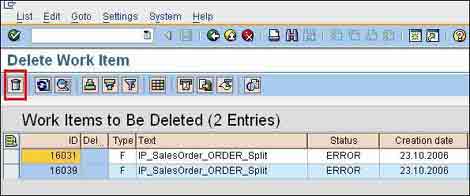
Call the transaction SWWL.
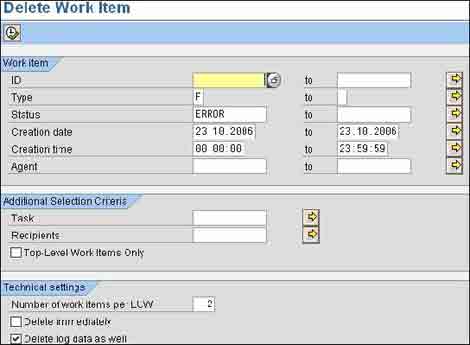
Delete appropriate work items.
Check that the messages are complete in SXI_MONITOR/SXMB_MONI.
Another simpler way to accomplish this is to use transaction SXMB_MONI_BPE . Select Continue Process Following Error under Business Process Engine -> Monitoring and Execute (F8). Update the selection criteria as required and Execute (F8). Choose the appropriate line item and click on Restart workflow button.
In these ways we can reprocess the messages failed on the outbound side. If the messages do not participate in BPM process, then they can still be traced via outbound queues or SM58 logs and restarted.


Naga says:
January 29th, 2008 at 9:41 pm
Hi riyaz when u say outbound side that means message fails to make it XI from ERP or msg fails in XI after coming from ERP (not sure abt this case) can u be little bit elobarate on this
Riyaz says:
January 29th, 2008 at 9:57 pm
Hi Naga,
In terms of SXMB_MONI, Outbound Status refers to the message transfer status from XI to the receiver system. So when message fails on outbound side, it means that message has been successfully processed in XI, but failed while sending it to the receiving system.
Do not confuse this convention with that for outbound interface and inbound interface. These are always with respect to communicating systems i.e. outbound interface is on sender side and inbound on receiver side.
Thanks.
Regards,
Riyaz
Amit says:
March 31st, 2008 at 10:41 am
Hi Riyaz
when i have send test message from adapter engine then following error occured
please help me
com.sap.engine.services.servlets_jsp.server.exceptions.WebServletException
com.sap.engine.services.servlets_jsp.server.exceptions.WebServletException: Error in dispatching request to servlet [/sub/componentmonitoringpageprocessor].
at com.sap.engine.services.servlets_jsp.server.runtime.RequestDispatcherImpl.doWork( RequestDispatcherImpl.java:319)
at com.sap.engine.services.servlets_jsp.server.runtime.RequestDispatcherImpl.forward( RequestDispatcherImpl.java:368)
at jsp_FC_Secure1142242888046._jspService(jsp_FC_Secure1142242888046.java:26)
at com.sap.engine.services.servlets_jsp.server.servlet.JSPServlet.service(JSPServlet.java:541)
at com.sap.engine.services.servlets_jsp.server.servlet.JSPServlet.service(JSPServlet.java:186)
at javax.servlet.http.HttpServlet.service(HttpServlet.java:853)
at com.sap.engine.services.servlets_jsp.server.HttpHandlerImpl.runServlet( HttpHandlerImpl.java:390)
at com.sap.engine.services.servlets_jsp.server.HttpHandlerImpl.handleRequest( HttpHandlerImpl.java:264)
at com.sap.engine.services.httpserver.server.RequestAnalizer.startServlet( RequestAnalizer.java:347)
at com.sap.engine.services.httpserver.server.RequestAnalizer.startServlet( RequestAnalizer.java:325)
at com.sap.engine.services.httpserver.server.RequestAnalizer.invokeWebContainer( RequestAnalizer.java:887)
at com.sap.engine.services.httpserver.server.RequestAnalizer.handle( RequestAnalizer.java:241)
at com.sap.engine.services.httpserver.server.Client.handle( Client.java:92)
at com.sap.engine.services.httpserver.server.Processor.request( Processor.java:148)
at com.sap.engine.core.service630.context.cluster.session.ApplicationSessionMessageListener .process(ApplicationSessionMessageListener.java:33)
at com.sap.engine.core.cluster.impl6.session.MessageRunner.run( MessageRunner.java:41)
at com.sap.engine.core.thread.impl3.ActionObject.run(ActionObject.java:37)
at java.security.AccessController.doPrivileged(Native Method)
at com.sap.engine.core.thread.impl3.SingleThread.execute(SingleThread.java:100)
at com.sap.engine.core.thread.impl3.SingleThread.run(SingleThread.java:170)
Caused by: java.lang.NullPointerException
at com.sap.aii.rwb.web.componentmonitoring.viewcontroller.CmDynPage.doProcessAfterInput( CmDynPage.java:61)
at com.sapportals.htmlb.page.PageProcessor.handleRequest(PageProcessor.java:101)
at com.sapportals.htmlb.page.PageProcessorServlet.handleRequest( PageProcessorServlet.java:62)
at com.sapportals.htmlb.page.PageProcessorServlet.doPost( PageProcessorServlet.java:22)
at com.sap.aii.rwb.web.componentmonitoring.viewcontroller.CmPageProcessor.doPost( CmPageProcessor.java:35)
at javax.servlet.http.HttpServlet.service(HttpServlet.java:760)
at javax.servlet.http.HttpServlet.service(HttpServlet.java:853)
at com.sap.engine.services.servlets_jsp.server.runtime.RequestDispatcherImpl.doWork( RequestDispatcherImpl.java:312)
… 19 more
Thanks
Amit Shivhare
Riyaz says:
March 31st, 2008 at 11:32 am
Hi Amit,
Find out whether the adapter engine is running properly. You can check the status using component monitoring in RWB. The Basis administrator should be able to resolve the issue.
Regards,
Riyaz