Beginner’s Guide to ALE and IDocs - a step-by-step approach
This article will help you understand the basics of ALE and IDocs via a simple do-it-yourself example. We will create a custom IDoc in one SAP system and then post some business data through it to another SAP system. Business data will be picked up from custom data dictionary tables.
ALE – Application Link Enabling is a mechanism by which SAP systems communicate with each other and with non-SAP EDI subsystems. Thus it helps integration of distributed systems. It supports fail-safe delivery which implies that sender system does not have to worry about message not reaching the source due to unavoidable situations. ALE can be used for migration and maintenance of master data as well as for exchanging transactional data.
The messages that are exchanged are in the form of IDocs or Intermediate Documents. IDocs act like a container or envelope for the application data. An IDOC is created as a result of execution of an Outbound ALE. In an Inbound ALE an IDOC serves as an input to create application document. In the SAP system IDocs are stored in the database tables. They can be used for SAP to SAP and SAP to non-SAP process communication as long as the participating processes can understand the syntax and semantics of the data. Complete documentation on IDOC is obtained by using transaction WE60.
Every IDoc has exactly one control record along with a number of data records and status records. Control record has the details of sender/receiver and other control information. Data records contain the actual business data to be exchanged while the status records are attached to IDoc throughout the process as the IDoc moves from one step to other.
Now, let us understand the ALE Configuration by means of an example scenario below:
The Scenario
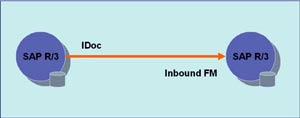
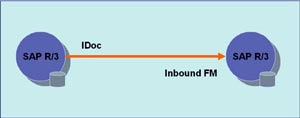
Data from custom tables (created in customer namespace) is to be formatted into an IDoc and sent from one SAP R/3 system to another using ALE service. We need to have two instances of SAP R/3 systems or we can simulate this on two clients of the same SAP R/3 system.
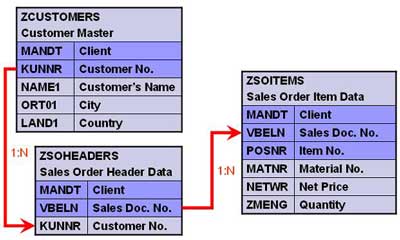
Create three tables as shown below.
Creating Custom IDoc type and Message type
All the objects created should be present on both source as well as target system(s).
1. Create segments – Transaction WE31
- Create a segment ZRZSEG1
- Add all fields of table ZCUSTOMERS to it
- Save the segment
- Release it using the menu path Edit -> Set Release
- Similarly create two more segments given below
- Seg. ZRZSEG2 – to hold all fields of table ZSOHEADERS
- Seg. ZRZSEG3 – to hold all fields of table ZSOITEMS
2. Create Basic IDoc type – Transaction WE30
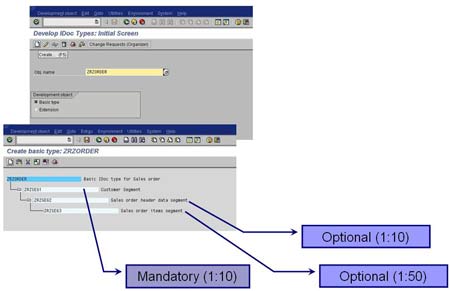
- Create a Basic type ZRZORDER
- Add the created segments in the hierarchy shown
- Maintain attributes for each of the segments
- Save the object and go back
- Release the object using the menu path Edit -> Set Release
3. Create/Assign Message type – Transactions WE81/WE82
- Go to WE81
- Create a new Message type ZRZSO_MT
- Save the object
- Go to WE82 and create new entry
- Assign the message type ZRZSO_MT to the basic type ZRZORDER
- Also specify the Release Version
- Save the object
Thus we have defined the IDoc structure which will hold the data to be transferred. In the next part of the article we will understand the outbound settings, i.e. the settings to be done in the source system.


sameer says:
March 5th, 2008 at 2:38 pm
Hi,
I found this very useful but I have few doubts
I am creating IDOC in CRM-IDES and sending it to Solution Manager IDES. I have defined two logical systems CRMCLNT800 and SMCLNT800. The problem is on both the systems the client no is 800. How to assign client 800 (already present in the list of clients) to both the logical systems. OR Is it that these clients which we are assigning to the logical systems have no relation with the SAP system client.
Please help.
Sameer
Riyaz says:
March 5th, 2008 at 9:27 pm
Hi Sameer,
You need to assign client to logical system in their respective systems only (see the next part of this article series).
In your case, in CRM system, create entries for both logical systems (CRMCLNT800 and SMCLNT800), but assign client 800 to CRMCLNT800 only. Similarly, in SM system, create entries for both logical systems (CRMCLNT800 and SMCLNT800), but assign client 800 only to SMCLNT800.
Assigning a client to a logical system simply tells SAP that this particular client will be referred to while communicating using this logical system name.
I hope this answers your query. If not, please revert. I will be more than happy to help you out.
Thanks.
Regards,
Riyaz
Madan Ullasa says:
March 12th, 2008 at 8:22 pm
Your step by step guide is really good.
Riyaz says:
March 13th, 2008 at 11:35 am
Thanks Madan for your compliements
Krishna says:
March 22nd, 2008 at 3:27 am
HI Riyaz,
you are the BEST. KEEP IT UP.
thanks very much for the SOAP ADAPTER ARTICLE.
Please try to explain other concepts of SAP like BAPI, WEBSERVICES, SAP XI JMS ADAPTER, etc…
we have so many material for these but dont know getting much knowledge from your blogs.
there is some magic in your blogs. they are simple and easy to implement. very well explained and formatted.
thank you very much for your time.
Riyaz says:
March 22nd, 2008 at 8:41 pm
Thanks a lot Krishna for your compliments
I am happy to know that you liked the content and it helps you.
I will be posting the articles on the content you suggested. You can find all SAP articles at this link.
There is also a series of posts about creating web services in XI, consuming them in Web Dynpro, and designing UI for the same. Do check them out.
Thanks again!
Regards,
Riyaz
sudheerraja says:
April 15th, 2008 at 9:16 pm
Hi Riaz,
I am from a java background recently moved to XI. I found out your site while searching for blogs for good Xi stuff. I found it is the best blog, I have ever seen. it is very simple and more meaningful. I would be happy if you can post more posts regarding the part of java role in realtime projects. like mapping java mapping , xslt mapping . I found many articles explaining bits and pieces, I could not find any article which gives clear idea of parsers like SAX AND DOM and thier participation while doing complex Idoc scenarios. It would be greate if you can write some article covering with screenshots and coding.
Ultimately i want to tell you. You are the best blogger….. Keep it up.
Thanks
sudheer
Riyaz says:
April 15th, 2008 at 9:29 pm
Hi Sudheer,
Thanks a ton for your compliments. I will soon be adding articles on mappings including Java mapping.
Its good to know that articles are useful to you
Regards,
Riyaz
Hemanth Kumar says:
April 30th, 2008 at 12:35 pm
Please tell me if there are any institues in bangalore for XI coaching…
Riyaz says:
April 30th, 2008 at 2:05 pm
You can go for SAP Education training (SAP Education), or any authorized SAP training institute like Genovate, Siemens. Details here.
Srinivas says:
July 2nd, 2008 at 12:28 am
Does any of the idoc have these tables:
VBRK
VBRP
VBAK
VBPA
VBKD
Riyaz says:
July 2nd, 2008 at 9:36 am
Hi Srinivas,
For sales order you can use ORDERS or ORDCHG IDoc and for Invoice/Billing document you can use INVOIC01 or INVOIC02 IDoc.
Hope this helps.
Regards,
Riyaz
Ray says:
July 15th, 2008 at 4:42 pm
Hi experts,
I need to convert data from legacy system to SAP CRM 6.0 using a txt file as input. I need to convert data of “opportunity”.
My concern is: Looking to the transaction, I know what fields are required, in the screen. Nevertheless I’m don’t know what tables are internaly filled out.
If I create a segment, I will map just the fields I can see through the screen. Does the process of loading fill all tables that are used when I enter data through the screen?
Ps: I intend to use LSMW to call the IDOC.
Tks in advance,
Ray.
Riyaz says:
July 16th, 2008 at 10:22 am
Hi Ray,
This very much depends on the IDoc posting program that you use in LSMW. May be going thru the program documentation or code would help.
Hope this helps.
Regards,
Riyaz
Vamshi says:
August 1st, 2008 at 12:39 am
Hi Riyaz,
You have any kind of documentation for creating a IDoc for SAP HR Benefits. As we are implementing EDI 834 for the new health carrier.
Thanks & Regards,
Vams
Riyaz says:
August 1st, 2008 at 11:03 am
Hi Vams,
Apologies…I dont have the relevant documentation.
Regards,
Riyaz
Julie says:
August 20th, 2008 at 1:42 pm
Hi Riyaz,
i have a question
am i have to creat the 3 new tables ZCUSTOMERS etc.
how about using the transp.table KNA1 ?
Thank u
best wishes:)
Riyaz says:
August 21st, 2008 at 12:54 pm
Hi Julie,
This is just an example. You can use any tables you wish. I have described using custom tables so that you dont change any standard table data inadvertently.
Regards,
Riyaz
Venkat says:
August 24th, 2008 at 5:57 am
Hi Riyaz,
Our client is using both SAP 4.7 and SAP ECC 6.0, and the Corporate account is in SAP ECC 6.0, so the Liability on SAP 4.7 is to be posted in SAP ECC 6.0 Corporate Account. We are using BizTalk as our middleware tool which is converting flat file into an IDOC, FIDCCP01 for SAP 4.7 and FIDCCP02 for SAP 6.0.
Now the Liability on SAP 4.7 system needs to be posted on SAP 6.0 Corporate account, for that our initial thought was to use ALE between SAP 4.7 and SAP ECC 6.0, but the business is now saying we dont want to use ALE, we want the IDOC to be posted into SAP 4.7 and SAP ECC 6.0 as well for posting the Affiliate Corporate J/E into SAP 6.0.
Adnan Maqbool says:
August 27th, 2008 at 10:31 pm
Dear Riyaz
It was really a very nice tutorial which I have ever read on IDOCs. All steps were clearly defined and self explanatory..
I need a little more help from your end , I had made all configurations and IDOC is creating and sending successfully at sender end. But I am not able to read them at receiver end. I have made correct entry for sender and receiver port and partners number but Idoc are not receiving at receiver end.
Will you please give some tips to troubleshoot the receiver end. Will be regretful to you.
Thanks
Riyaz says:
August 28th, 2008 at 10:45 am
Hi Adnan,
Try using transaction SM58 and check if the IDoc is stuck there. You can use this transaction in both the systems. You will find the error details/network connection failure details there.
Regards,
Riyaz