XI/PI: Simple IDoc Communication using SAP XI
SAP XI IDoc Adapter is by and far the most widely used adapter. This article describes its configuration on sender and receiver end along with related settings in XI and the involved SAP application systems. The configuration is fairly easy and straightforward. This article simply summarizes the different steps involved.
IDoc Adapter converts the incoming IDoc to XML and XML messages to outgoing IDoc. The IDoc adapter resides on the ABAP stack of the integration server and hence no Sender Agreement is necessary in order to setup the sender adapter. A point to note is that using IDoc adapters, we can only have asynchronous (tRFC) processing. Apart from using Runtime Workbench and transaction SXMB_MONI, IDoc messages can be monitored using transaction IDX5.
Now, let us understand the settings required in order to send an IDoc from SAP Application system to XI.
IDoc Sender Adapter Configuration
The source SAP Application system must be setup to send IDoc to the XI server. In one of my previous articles, I have described how to set up the source SAP Application system to send an outbound IDoc.
On the XI system, create a RFC destination of type R/3 connection, pointing to the source SAP Application system. Also, create a port for the source system using transaction IDX1. Mention the above created RFC destination in the IDX1 port configuration. This is required as XI uses this configuration to read the IDoc metadata from the source system. Once you have done this, your XI system is ready to receive IDocs from the source SAP system.
The metadata for an IDoc is loaded in the Integration Server when the first message for the particular IDoc is processed by the Integration Engine. You can see the IDoc metadata using the transaction IDX2. If you dont see the metadata for your IDoc in transaction IDX2, you can manually load it using the Menu options in IDX2. You need to specify the port and the IDoc type before you can import the IDoc metadata.
You can then import the IDoc definition from the source SAP system in XI Integration Repository and build your scenario on it. Then complete the Directory configuration necessary for your scenario. You don’t need to create any sender agreement as IDoc adapter resides on integration engine itself.
IDoc Receiver Adapter Configuration
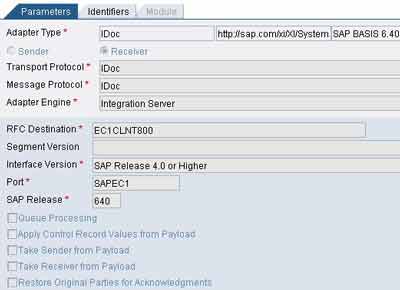
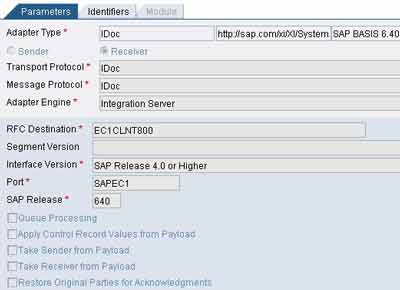
Configuring IDoc Receiver Adapter is equally easy. On the XI system, create the RFC destination of type R/3 connection, pointing to target SAP Application system using transaction SM59. Create a port for the target SAP system using transaction IDX1. Mention the above created destination and port names in the communication channel used in your receiver agreement. Adjacent figure shows the configured IDoc receiver.
In the target system, you should create the partner profile for the source system using the transaction WE20. For a detailed understanding refer my post on Settings in R/3 Partner System to Receive IDocs. This post discusses the steps assuming you are using a custom IDoc. In case you are using a standard IDoc you are only required to define the source system in transaction BD54 and create a partner profile using WE20 as discussed in the same article.


leela says:
February 21st, 2008 at 1:05 pm
Hi…
The information is fine.Can u please send the IDOC to IDOC scenario by step by step procedure. And i also want the R/3 settings.
Riyaz says:
February 21st, 2008 at 1:51 pm
You can refer to this article to do the sender side configuration - set up the source SAP Application system to send an outbound IDoc. For IDoc receiver side you may want to see this article - Settings in R/3 Partner System to Receive IDocs.
This particular article (IDoc Communication using SAP XI) simply summarizes the IDoc adapter config steps for sender and receiver adapter.
If you need any specific information apart from this, or if you are facing any issues, please let me know. I will be more than happy to help.
Regards,
Riyaz
sai says:
June 13th, 2008 at 5:37 pm
Hi Riyaz,
we have 3 diff R/3 systems. Whenever any sales order creates in any of the systems that needs to captured in system 4 (r/3) for consolidation purpose. Here we don’t need to create the sales order in system4 but we required to capture this information in a Z table. What will be best possible solution for this type.
Thanks,
Sai Damerla
Riyaz says:
June 16th, 2008 at 9:43 am
Hi Sai,
You can set up IDoc to proxy scenarios. So whenever ORDERS IDoc is posted, the same can be passed on to the Z-table by means of proxy on the receiver side.
If the target system is not on WAS 640 or above, then you can create a RFC function module on the target side and use IDoc to RFC scenarios.
Regards,
Riyaz
XYZ says:
June 24th, 2008 at 5:38 am
Hello, I am new to this website as well as SAP… I am trying to learn SAP…. Once I log on to SAP GUI , when I try to open the SLD, it opens and I want to create a new product as well as a new component version but it gives the following error….
Error on page…. because of this , I am not able to go further…. What do I have to to? Any suggestions, help would be appreciated…
Thanks
Riyaz says:
June 24th, 2008 at 9:55 am
your basis administrator would be able to resolve this
XYZ says:
June 25th, 2008 at 12:08 am
When I am in SLD and try to create new product version or software component version….It opens the corresponding window and when I click on new product version it starts to open…..that is continuing forever… I mean it shows that it is opening……but not… I can’t access anything…….with that cursor …I have to close it….there is no other way….What is happening? any suggestiond?????please help….
Riyaz says:
June 25th, 2008 at 10:02 am
Try clearing your browser cache and your system cache and see if it helps…make sure that the post installation checks have been carried out properly.
Rajesh says:
August 5th, 2008 at 3:50 pm
Hey Riaz,
I have a question for u..
why is IDoc communication channel designed in a such way that the user wud have to enter both the RFC Destination and Port as the Port by itself has an RFC destination beneath it..
Riyaz says:
August 5th, 2008 at 4:31 pm
Hi Rajesh,
The RFC destination specified in IDoc adapter is used for actual data transfer (payload) whereas the port specified is used to receive the IDoc metadata. Thus, the two RFC destinations can be different and can even point to different SAP instances.
Hope this helps.
Regards,
Riyaz
Madhu Pusala says:
August 6th, 2008 at 3:18 am
Hi Riyaz,
Your articles are good and very use full. Please keep posting articles.
p says:
October 2nd, 2008 at 9:37 pm
Hi Riyaz,
I have a BPM posting IDocs to an ECC system. The msg shows success however the outbound status flag is red. Why does this happen? How can I fix it?
Riyaz says:
October 3rd, 2008 at 12:32 pm
Hi,
For errors on the outbound side refer this article. It addresses exactly the same problem you are facing.
Regards,
Riyaz
Prakash says:
November 14th, 2008 at 11:07 am
Is there a way to programmatically (either within or outside SAP) to enable and disable RFC users?
Riyaz says:
November 18th, 2008 at 9:59 am
Prakash,
You might want to try out BDC approach on trasaction SU01 to lock/unlock users.