XI/PI: File Content Conversion for Complex Structures
We have discussed Simple File Adapter Configuration as well as File Content Conversion for a simple structure CSV file. In this article we will understand how to deal with File Adapter when file structure is a bit complex. For example if it has different number of columns of information on different rows.
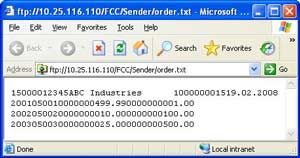
Let us take an example of a simple sales order. Assume that sales order is received in form of a text file. The first row has header information like customer details and order details; whereas the remaining rows have order items details. Every field has different lengths and there are no field separators. The adjoining figure shows such a file with minimal fields.
Sender File Adapter Configuration with Content Conversion
The figure below shows a typical configuration of the sender file adapter. Specify File Content Conversion as message protocol. Document Name and Namespace correspond to the message type from the Integration Repository. Recordset Name defines the root node under which rest of the XML will be created. If left blank, it defaults to ‘Recordset’. If you do not want this extra node to be inserted, you can set the parameter ignoreRecordsetName to true (Thanks Mike for this input). See this link for exhaustive list of available parameters.
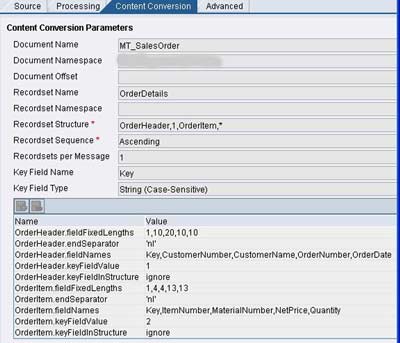
Specify the name and occurrence of each sub-node in Recordset Structure. In this case, OrderHeader node occurs once while OrderItem node can occur any number of times. Key Field Name and Key Field Type help in differentiating different substructures. In this case Key =1 implies OrderHeader node while Key = 2 implies OrderItem node.
Different parameters are given below –
- <node>.fieldFixedLengths – comma-separated ordered list of field lengths in the particular node
- <node>.endSeparator – identifies end of record
- <node>.fieldNames – comma-separated ordered list of field names in the particular node
- <node>.keyFieldValue – Value of the key field
- <node>.keyFieldInStructure – ‘ignore’ (without quotes) indicates that the Key field should not be generated in the resulting XML whereas ‘add’ (without quotes) indicates that it should be added.
For a detailed list of parameters visit this page.
Receiver File Adapter Configuration with Content Conversion
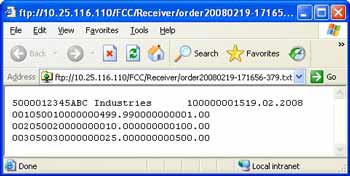
Assume that we want to construct a text file in the similar format from the XML. The generated file should be something like the one shown in the figure on right.
The figure below shows the typical configuration for the receiver file adapter using file content conversion. Specify the comma-separated list of root node and substructures under the Recordset Structure as shown. Then define the parameters as per the requirement.
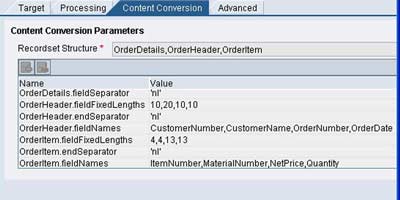
Most common parameters are <node>.fieldSeparator or <node>.fieldFixedLengths, <node>.endSeparator, <node>.fieldNames. For a detailed list of available parameters please refer this page.
Thus we have learned how to configure the SAP XI file adapter on sender and receiver side. We have also covered the File Content Conversion when dealing with simple structures as well as with advanced or complex structures.


Karthik says:
March 5th, 2008 at 11:41 pm
Awesome is the word for this article. Hats off to you. New to XI. Very informative. Going to try it.
Riyaz says:
March 6th, 2008 at 12:00 am
Hi Karthik,
Thanks a ton for your encouraging compliments
Regards,
Riyaz
William says:
March 14th, 2008 at 8:07 pm
Hi,
Great article!! This helps me out a lot. I am facing a lot of problems exactly on this issue. But I still have some questions though..
1) I don’t understand how MT_SALESORDER should look like in the integration repository. It seems that you describe the structure of the inputfile in the Orderheader.fieldnames-section and Orderitem.fieldnames-section. Isn’t that redundant then?
2) Can you please put a screenshot of the MessageType MT_SALESORDER?
3) Interface-determination still has to be done on the “source”-tab right?
4) What is the purpose of the Recordset Name? I don’t see “Orderdetails” coming back anywhere in the configuration
5) Please explain again how to use the keyfield name and keyfield type, as I don’t understand.
6) Where do I have to specify if my input-file is comma separated?
Thanks in advance and kind regards
William.
Riyaz says:
March 15th, 2008 at 1:45 pm
Hi William,
Thanks for the compliments!
1) Note that the structure you provide under .fieldNames is the structure used while generating XML from the source file. i.e. in the above example, the structure would look like something below -
MT_SalesOrder
–OrderDetails
—-OrderHeader (occurs only once)
—–CustomerNyumber
—–CustomerName
—–OrderNumber
—–OrderDate
—-OrderItem(occurs unbounded)
—–ItemNumber
—–MaterialNumber
—–NetPrice
—–Quantity
You should create this structure in accordance with the input file structure.
2) Let me know if above doesn’t help, I shall post the screenshot of the IR structure.
3) I did not exactly understand your question. However, all ID config steps remain the same and interface determination is also required.
4) Recordset Name is the name of the root node that should be created in the generated XML (see the above structure). If you dont provide this, a default name called Recordset is used.
5) Since the source file has different structures on every row, key field values are used to identify and groups the similar structures. Note the .fieldNames parameters in the above figure. Each one has an element called ‘Key’ and there is a corresponding .keyFieldValue parameter. Hence, Key Field Name is used to specify the name of the field whose value should be used to identify the structure. e.g. Key with value ‘1′ implies OrderHeader, Key with value ‘2′ implies OrderItem. Key Field type is the type of value the field contains. You could use either Integer or String in this case.
6) Since, structure for different rows is different, you have to specify the field separator for every structure involved. You can use the .fieldSeparator parameter for the same. In our case, we have used .fieldFixedLengths instead, since we are not using a CSV file. If your file structure on each row is same, you can refer this article.
Let me know if this helps. Also, revert if you need more help. I will be more than happy to help you through.
Thanks.
Regards,
Riyaz
William says:
March 17th, 2008 at 1:54 pm
Hi Riyaz,
this indeed helps me out a lot. As I am new to XI I am struggling a bit currently so every help is welcome
One more question…my target-file should not be XML but .TXT. Is there an easy way to tell XI this?
Thanks again,
William
Riyaz says:
March 17th, 2008 at 3:44 pm
Hi William,
While providing the filename specify the .txt extension. You can use wildcards if your filename is not fixed, for example, you could provide *.txt, or *order*.txt etc.
Since, your target file is TXT and not XML, you will need to use content conversion in the receiver file adapter.
Regards,
Riyaz
Vincent says:
March 25th, 2008 at 5:30 pm
Hello Riyaz,
Your atricles are excellent and informative too. Howevere I just observed this FCC and I also did configure the FCC to create a text file. In my configurations I have used only and given the sizes of each field in that record and it still works.
I need not use a field separator. In this case, the field sizes would be used to separate the fields. So the output would look something like this:
ABC DEF GHIJKL
Is there something mandatory that is missing here that I need to use?
Thanks in advance,
Vincent
Vincent says:
March 25th, 2008 at 5:32 pm
I meant to say I have used only with the name of the node fieldFixedLengths and it still works.
Riyaz says:
March 26th, 2008 at 9:35 am
Hi Vincent,
Thanks for your compliments.
Note that either of the two paramaters - fieldSeparator or fieldFixedLengths is mandatory. It depends on the structure you are using. Use fieldSeparator if you need to separate values by some character like a comma (See this article), and use fieldFixedLengths if you want to specify lengths of each of the fields.
In the current article, I have used fieldFixedLengths. Note that fieldSeparator is used only for the root node i.e. OrderDetails node. Since this node contains only child nodes and does not contain any elements, may not really be necessary to provide an entry for fieldFixedLengths or fieldSeparator.
Regards,
Riyaz
Mike Nelson says:
April 4th, 2008 at 12:22 am
This article really helped me build my inbound CSV file. Thanks.
I have done all of this set up and my file gets converted to xml in what looks like the correct matching Message type structure. But I can not get it to map. I took the xml out of the pipeline in Moni and tried to test with it directly on the message map. Two things I noticed.
1. It has a namespace that was generated. If I bring this namespace with when I try to test it creates 2 TOP NODES. I assume XI is smart enough to remove the namespace when it actually uses the xml? If not how do I get rid of the namespace?
2. If I manually remove the namespace and test with the pipeline XML my inbound structure turns all RED (supressed). The data lines up perfectly in the structure but when I test and look at the QUEUE it says supressed for all my input values? Has anyone seen this, and what is the best way to test this type of scenario?
thanks,
Mike
Mike says:
April 4th, 2008 at 1:59 am
Please disregard my prior post. I had to use the ‘ignoreRecordSetName’ = true option to remove the extra top node tag. Once I did that it worked perfect.
thanks,
Mike
David Mason says:
May 1st, 2008 at 2:20 am
Hello Riyaz
Your articles on Content Conversions for both Simple and Complex structures was very helpful. However, I am stuck at the moment.
My problem is that I am passing IDOC PAYEXT.PEXR2002 directly to XI via R3, and my scneario is picking up the Payment, but I need to flatten the file into a text file before I can FTP the file to the Bank.
Here is my scenario:
Adapter Type: File (Receiver)
Transfer Protocol: FTP
Message Protocol: File Content Conversion
Adapter Engin: Integration Server
What I need is some direction how to create the Recordset Structure for the IDOC PAYEXT.PEXR2002 and what parameters would be needed.
Any help would be greatly appreciated.
Thanks,
Dave
Riyaz says:
May 1st, 2008 at 1:02 pm
Hi Dave,
Its good to know that you found the content useful. Thanks for the compliments
As I understand, you want to create a flat file from the IDoc XML and that the flat file structure is predefined by the bank you are communicating with.
To use File Content Conversion, study the structure of the target format given by the bank. Note the common structures. Note the order in which the fields and rows should appear in the target. Now based on this information, create a target XML format (Target data type, message type). Then do the mapping to get the required data in the target format. Thus you will get a XML file that needs to converted in a flat file using content conversion.
Now you can follow the steps in the above article to do the content conversion as per your requirement. I would suggest to create the target XML (message type/data type) in such a way that your content conversion would be least painful.
Let me know if this helps. Do revert if you need more help.
Note: If your bank is using any EDI formats like EDIFACT etc., it is advisable to go for third party adapters like Seeburger.
Regards,
Riyaz
Krishna says:
May 4th, 2008 at 1:54 am
Hi Riyaz,
If somehow I get the power to award anyone in SAP world, then you will be the one for sure without any doubt.
You are brilliant, your patience in writing articles, way of explaining is just brilliant.
Please one request to you. You are performing but still I want to request please don’t stop writing.
You are the star giving light for us to walk towards SAP XI technology.
Can I get your email address? I want to meet you sometime if possible, or else please send me a test mail to krishplace@googlemail.com
Thanks once again for all your hard work in writing articles.
Kind Regards
Chris
Krishna says:
May 4th, 2008 at 5:02 am
Hi Riyaz,
I am practicing file content conversion parameters. I am stuck at the following at one point. If you see the below source and target structures.
First row contains the data about the BookingCode Node. I am failing to convert the BookingCode node. Rest of the nodes were getting fine.
I have used keyField of type integer for each row.
Some of the configuration parameters which i Set in the example were:
Recordset name: Order
Recordset Structure: BookingCode,1,Passenger,1,Flight,*
Key Field Name : key
Key Filed Type : Integer
Now I am confused how to use BookingCode which doesnt have any children but just a value in the target xml.
Can you please let me know how to get BookingCode Node in the target xml with just a value?
my source csv file is
——————————————–
12KY34R
2Smith 123 Main St.
304042004SX21 ZRHFRA
304042004LH4025FRALAS
304042004UA128 LASSFO
——————————————–
and I would like to convert to
——————————————–
2KY34R
Smith
123 Main St.
04042004
SX
21
ZRH
FRA
04042004
LH
4025
FRA
LAS
04042004
UA
128
LAS
SFO
——————————————–
Thanks and Regards
Chrish
Riyaz says:
May 4th, 2008 at 8:38 pm
Dear Chrish,
Thank you very much for your overwhelming compliments. I will surely be adding more articles on this website.
As for the file content conversion in your case, the structure is similar to the one I explained in the above article.
If I am not wrong, both source and target files are non-xml. So you will need to use file content conversion in both sender and receiver file adapter. Hence, the solution is quite simple.
when you generate source xml from source file, use a dummy node (say BookingHeader) to hold the BookingCode node. e.g.
......
<BookingHeader>
<BookingCode>2KY34R</BookingCode>
</BookingHeader>
<Passenger>
...
...
</Passenger>
<Flight>
...
...
</Flight>
...
...
and when you do the message mapping, create a structure of the target XML, such that you only have the BookingCode node in target.
Now you have the target XML as per your requirement, so you can easily use content conversion on the receiver side to create your target file.
Since you want each field on a newline, you can assign ‘nl’ value to .fieldSeparator and .endSeparator parameters.
Do revert if you need more info. Also let me know if this helps.
Regards,
Riyaz
William says:
May 5th, 2008 at 11:17 pm
Hi Riyaz,
Thanks a lot for your previous answers, they already helped me out a great deal, but I just keep struggling with the following:
I have a flat file as input, with 1 recordtype “headerdata” (1..1) and 1 recordtype “positiondata” (1..n). Within this recordtype “positiondata” there is a third repeating recordtype “positionpartner”s”(1..n). And recordtype 4 always occurs once within recordtype 2. So within recordtype 2 there is an optional repeating recordtype 3 and a mandatory recordtype 4.
I defined the logical structure in IR as follows:
recordtype 1 (1..1)
recordtype 2 (1..n)
<<<recordtype 3 (0..n) so repeating within recordtype 2
<<<recordtype 4 (1..1) always once within recordtype 2
Now, how do I define this structure in the file conversion section of the sender file adapter? The last field of recordtype 2 should be a keyfield again I guess but how do I tell the adapter this?
Hope you can help
Thanks,
William
Riyaz says:
May 6th, 2008 at 2:55 pm
Hi William,
Content conversion works with only flat XML structures.
A possible solution/workaround could be like this. (I have not tried this, but will try out) -
Create two source data types. First one (say dt_source1) with a flat XML structure i.e.
recordtype 1 (1..1)
recordtype 2 (1..n)
recordtype 3 (0..n)
recordtype 4 (1..1)
and the second one (dt_source2) with a nested structure as per your requirement -
recordtype 1 (1..1)
recordtype 2 (1..n)
»»recordtype 3 (0..n)
»»recordtype 4 (1..1)
Now, do the file content conversion and generate XML as per the first XML structure (dt_source1). This is simple as I explained in the above article.
Now create two mappings - one between first source structure (dt_source1) and the second structure (dt_source2). And other mapping between second structure (dt_source2) and your target structure.
In your interface mapping, specify both the mapping programs in the correct order (one below the other). You can use the ‘+’ button to add one more row. These mappings will be executed in the same order.
To map dt_source1 to dt_source2, you can use java or XSLT mapping. You can as well use graphical mapping, just make sure you do the context handling correctly.
Please let me know if this helps. I will as well try this at my end.
Regards,
Riyaz
Krishna says:
May 7th, 2008 at 10:38 pm
Hi Riyaz,
Sorry for getting back bit late. Thank you very much for your response.
But what if I dont want to create BookingHeader. Is it possible to assign the value directly to BookingCode rather than creating dummy node BookingHeader?
Thanks
chrish
Riyaz says:
May 8th, 2008 at 10:43 am
Hi Chrish,
I dont think its possible without a dummy node. At least I cant think of any other workaround. This is because either of fieldSeparator or fieldFixedLengths parameters is mandatory. Also somewhere you have to specify the KeyFieldValue and its position in the node. So you can only specify nodes, not individual fields on the left side of the parameters table.
And as far as dummy node is concerned, it certainly does not put any business impact as the conversion is at the source side and you can take care of it during the mapping transformation.
Regards,
Riyaz
Krishna says:
May 12th, 2008 at 2:35 pm
Hi Riyaz,
Thanks for your response. You are right may be it’s not possible because of mandatory pararmeter fieldFixedLengths and fieldSepeartor.
Also do you have any plans for the article on Monitoring - like CCMS, PMI, Alert, Message Monitoring, Performance monitoring, cache Monitoring,etc…
Regards
Krishna
Riyaz says:
May 12th, 2008 at 3:01 pm
Yes Krishna,
I will be adding up more articles to the website including these topics. You can keep track of new content by email subscription or RSS subscription. The link is available in the sidebar on the right.
Thanks.
Regards,
Riyaz
Venkatanarayana says:
July 7th, 2008 at 3:52 pm
Hi Riaz,
If suppose my FCC like, the xml file contains full of attribute in the input file then how to create the Record set structure.
example xml>
0.114
0.11
0.105
0.097
0.092
0.085
0.081
0.079
0.075
0.073
0.07
0.067
0.062
0.06
0.059
0.056
Riyaz says:
July 8th, 2008 at 11:04 am
Hi,
Assuming you have a non-XML source file, you can use a workaround like this -
Use File Content Conversion to create both elements and attributes as elements i.e. your FCC converted structure would look something like -
<Parent_node>
<subnode1>value1</subnode1>
<attribute11>attribute_value</attribute11>
<attribute12>attribute_value</attribute12>
<subnode2>value2</subnode2>
<attribute21>attribute_value</attribute21>
<attribute22>attribute_value</attribute22>
<subnode3>value3</subnode3>
<attribute31>attribute_value</attribute31>
….
….
</Parent_node>
Now, in the message mapping, use a two step mapping. In the first mapping, convert the attribute elements to actual attributes using graphical mapping and appropriate data types/message types. Thus you will have the desired structure with your elements and attributes. Then in the second mapping do the actual mapping to convert the source to target structure.
To see how to use two-step mapping within interface mapping see this link.
Hope this helps.
Regards,
Riyaz
Sampath says:
August 13th, 2008 at 6:09 pm
Hi Riyaz,
Your website is very informative.
I have a condition where i need to convert a hierarchical file into XML using File content conversion.
Source:
Seg 100
seg110
seg200
seg210
seg300
seg315
Note that all the segments are mandatory.
Can i some how get this input file converted??
Waiting for your response!
Thanks in Advance!
Regards,
Sampath