XI/PI: Sending Emails Using XI Mail Adapter
In this article we shall discuss the configuration of SAP XI Mail Adapter on the receiver side. The receiver mail adapter resides on the J2EE stack and converts the XI messages into emails and transfers them to email server or in simple words sends them as emails to intended recipient(s).
The adapter supports SMTP as well as IMPA4 protocol. Message protocol provides two options, namely XIALL and XIPAYLOAD. In the former entire SOAP message is sent as an attachment in mail along with the payload while in the latter only the message payload is sent.
Configuring the Receiver Mail Adapter
Let’s say you want to send incoming XML message as an email. The mail adapter provides two options – one using the mail package and one without using mail package. When you do not use mail package you have to provide the email header details (like To and From addresses, Subject line etc) in the adapter itself. There is no restriction on the XML message format or namespace.
However, when you use mail package, you have to adhere to a specific format of the source XML.
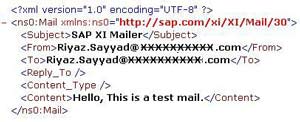
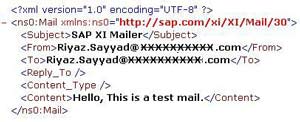
The figure above on the left shows a typical message structure that should be used while configuring receiver mail adapter with mail package. The Message Type must be named as ‘Mail’ and it must be present under the Namespace ‘http://sap.com/xi/XI/Mail/30’. Your message is bound to fail in adapter engine if this is not adhered to. This helps you to dynamically set email parameters like sender, receiver mail subject etc.
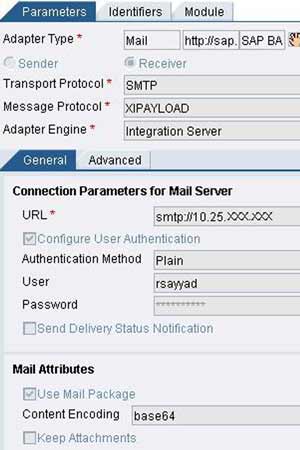
The URL of the mail server should be specified as shown below depending on whether you use SMTP or IMAP4.
smtp://EmailServer or imap://EmailServer/UserInbox
If your server required User Authentication, you can specify the same while configuring the adapter. If you want to request a delivery receipt, check the ‘Send Delivery Status Notification’ checkbox. The delivery receipt is delivered to the email address specified in the ‘To’ field. base64 content encoding is possible. The figure on the right shows a typical configuration of the receiver mail adapter.
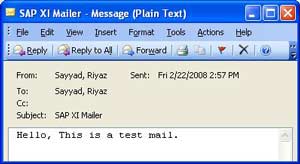
The output using the mail package is as shown below:
If you do not use mail package, the XI message will be sent to the static addresses as specified in the receiver mail adapter configuration. A typical output is shown below:
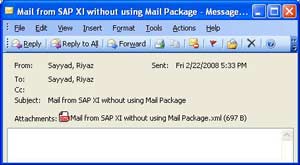
If you use XIALL as Message Protocol, the entire SOAP message is sent as an email attachment along with payload as shown below.
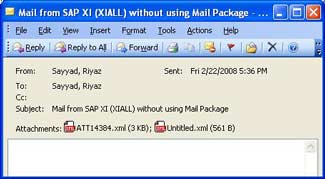
The first attachment in the email message shown above is the SOAP message while the second attachment is the actual payload.
As with any other J2EE adapter, you can enhance the adapter further using the adapter modules which can be specified in the module tab of the communication channel. This article discussed the simplest way to work with mail receiver adapter in order to send mails from XI server.


Sundar says:
March 13th, 2008 at 10:28 pm
Please let me know , how would i configure to get part of the incoming XML msges in the e-Mail body and part as attachment.
Riyaz says:
March 14th, 2008 at 11:06 am
Hi Sundar,
I guess for this you need to create and use ABAP or Java mapping. Then u can use custom adapter modules to further add the message as attachment.
Hemanthika says:
June 5th, 2008 at 5:38 pm
Hi ,
Here while using the receiver mail adapter, either the content is coming dynamically or the attachment is coming. But I need both the attachement and the dynamic content. Please suggest how it will work out .
Regards ,
Hemanthika
Riyaz says:
June 5th, 2008 at 10:19 pm
Hi Hemanthika,
You might need to use adapter modules to accomplish this. Try using PayloadSwapBean module to swap the application payload with one of the attachments - see this link for details.
If this does not help, check my email. I have sent you a how to guide.
Regards,
Riyaz
Riyaz says:
June 5th, 2008 at 10:29 pm
Have you tried with selecting both ‘Use Mail Package’ and ‘Keep Attachments’ checkboxes? If it does not work, then go for adapter modules as suggested above.
Tarek says:
June 10th, 2008 at 2:10 pm
Hi Gents,
I’ve been struggeling alot to acheive my requirement which is the following:
File adapetr picks up one file, and this file should be send as BOTH ( mail body and part of it i wanna create an attachment)
so simply i want create a body and attachment out of one message
i am using the Mail package..and i was successfully able to send emails either as an attachment ( the whole content becomes as attachment ) or as a body
But i couldn’t find a way where you can send both at the same time in one email
I tried to use all the adapter modules that you mentioned
the SwapBeans, and the MessageTransformBean
with no luck again same result
i can send email either with body AS and attachment
or send the same payload just as a body with no attachment
i also checked and Uncheked the Keep attachment in the adapter configuration but no luck
Please if you can help me in how to send an email with a body and with attachment i would really appreciate it
Regards
Tarek
Riyaz says:
June 10th, 2008 at 4:40 pm
Hi Tarek & Hemanthika,
Please go thru - https://www.sdn.sap.com/irj/sdn/weblogs?blog=/pub/wlg/6321.
Let me know if it helps.
Leela says:
June 18th, 2008 at 10:37 am
Hi…
I have done the file to mail scenario. In receiver side i have used the smtp adapter.I have followed the steps which u have specified. While executing it is showing the below error.
MP: Exception caught with cause com.sap.aii.af.ra.ms.api.RecoverableException: java.net.UnknownHostException: 172.16.186.216.corp.satyam.ad
Delivery of the message to the application using connection Mail_http://sap.com/xi/XI/System failed, due to: com.sap.aii.af.ra.ms.api.RecoverableException: java.net.UnknownHostException: 172.16.186.216.corp.satyam.ad.
Riyaz says:
June 18th, 2008 at 12:01 pm
Hi Leela,
Please check the URL for the smtp server that you have specified in the mail receiver adapter. It should be the complete hostname of your email smtp server. If you are using microsoft exchange server, you can find the hostname in the email account properties of your Outlook.
If specifying hostname results in error, specify corresponding IP address. You can find out IP address by pinging the hostname via command prompt.
Also make sure you provide the URL using correct syntax. For smtp it is -
smtp://hostname or for IP address something like smtp://10.25.123.456
Regards,
Riyaz
Reuben says:
July 31st, 2008 at 3:51 pm
Hi Riyaz,
To avoid missing out important parameters, etc, is the mailpackage message structure downloadable, and if ‘yes’ where?
Kind regards,
Reuben.
Riyaz says:
August 1st, 2008 at 11:02 am
Hi Reuben,
You can download the SAP note 748024 from SAP Marketplace. The Schema file is attached with this note.
Regards,
Riyaz
Uri says:
August 10th, 2008 at 7:30 pm
Hi Riyaz,
You have mentioned that “…Message Type must be named as ‘Mail’ and it must be present under the Namespace ‘http://sap.com/xi/XI/Mail/30’…”.
**Q**: in case i’m using XI 7.0, what would be the case then? (e.g., is the main cocept is still the same? what should be the namespace name?)
Riyaz says:
August 12th, 2008 at 10:38 am
Hi,
This does not change for PI 7.0. You need to use the same namespace and message type.
Regards,
Riyaz
Peter says:
August 28th, 2008 at 2:58 am
Hi Riyaz
i am using a scenarion with fileadapter + mailpackage and want to send an email with a pdf as a attachement.
in sxmb_moni it looks ok is see payload maindocument and te pdf file.
the mail however is containing 2 attachments with name untitled.xml and untitled.pdf.
what i want is that the original filename is placed in the attachment name.
this name is shown in sxmb_moni.
any suggestions.
your article is great, thanks
Riyaz says:
August 28th, 2008 at 10:57 am
Hi Peter,
I would suggest that you can consider using adapter modules like DynamicConfigurationBean. I guess it allows you to update the name of the file.
You can set Adapter specific message attributes for Filename in the sender adapter and then use ASMAs in receiver adapter or use DynamicConfigurationBean.
Also go thru this article if you prefer using Java mapping.
Regards,
Riyaz