PI 7.1: Publishing Service Interface as a webservice in SR

In PI 7.1 it is possible to publish Outbound or Inbound interfaces to call Service Interfaces as a webservice in Service Registry (SR). We can publish service interfaces in SR by two ways:

  1. Using Integration Directory
  2. Using Service Registry

1. Using Integration Directory

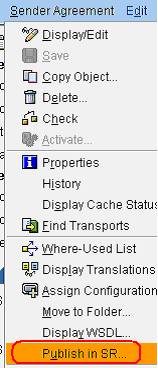
Go to Sender Agreement, click on Publish. Refer section 2 in order to Search or Test your services in SR.
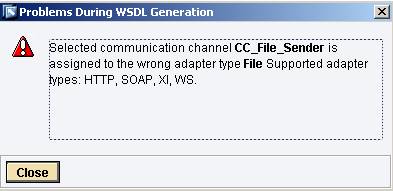
Note – Supported adapter types are HTTP, SOAP, XI, WS only. For other adapter it will pop an Error.
2. Using Service Registry

Required Endpoint WSDL for a service definition in order to publish it in the SR.

This information will help to know how we can Publish, Search or Test our services in SR.

Step 1 – Getting Endpoint WSDL for a service.

In Integration Directory→Sender Agreement→Display WSDL
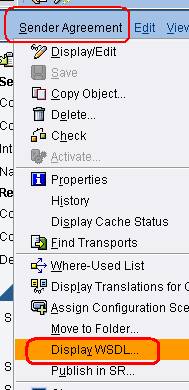
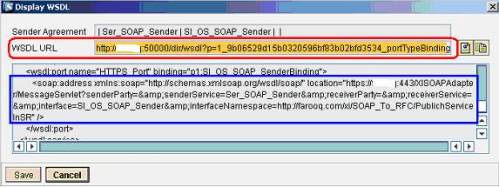
It will display the WSDL as well as provide End point WSDL URL that we can use in SR. In PI 7.1 it is not required to manually formulate your sender SOAP URL, generated WSDL contains all the required information.
Step 2 – Logon to Service Repository using http://<Hostname>:5<InstanceNumber>00/sr and enter the Endpoint WSDL address and click on Publish.
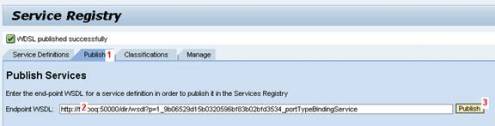
Step 3 – Once Service Interface published successfully; consumer can search services in SR and later can consume it.
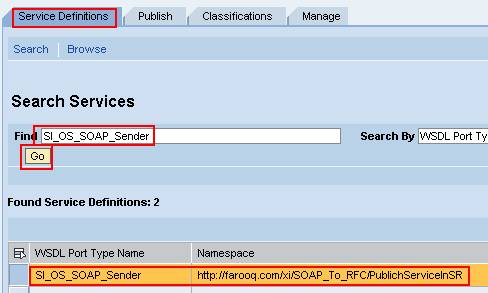
Step 4 – Test your services.

Click on Test button in order to Test your service.
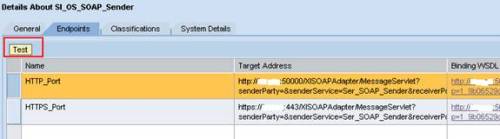
Click on the red marked button.
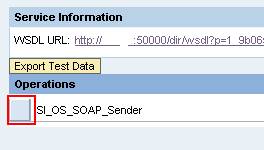
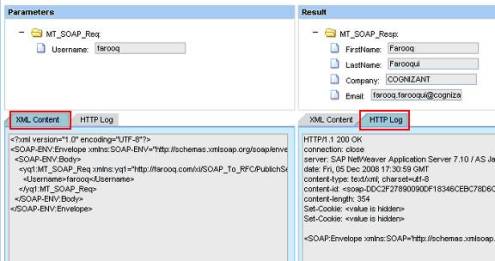
Step 5 – Enter parameters and execute it.
Farooq Farooqui is an SAP NetWeaver PI Consultant with Cognizant, India. He holds SAP PI Certification and has previously worked with majors like Accenture and Atos Origin.

This entry was posted in SAP, SAP Enterprise SOA, SAP Web Services, SAP XI / PI and tagged , , , . Bookmark the permalink. Post a comment or leave a trackback: Trackback URL.
Around the Web »»

4 Comments

  1. Srinivas
    Posted July 22, 2009 at 1:05 pm | Permalink

    Hi riyaz,
    This tutorial is very useful one.I would request you to send me or publish the detailed tutorial on,1.) integration between two third party Web service systems using PI 7.1
    2.)integration between SAP system and third party Web service using PI 7.1
    Thanks & Regards,
    Srinivas Kondamudi.

  2. Srinivas
    Posted July 22, 2009 at 1:09 pm | Permalink

    Hi Riyaz,
    This tutorial is very useful one.I request you to publish or send me the tutorials on,1.)integration between two third party Web services,2.)integration between SAP Web service and third party Web service.
    Thanks & Regards,
    Srinivas Kondamudi.

  3. Saqi
    Posted July 24, 2009 at 3:46 am | Permalink

    since the sender agreeement based services generates service and bindings dynamically and one do not have control over the name for service and binding, in this once you transport the objects across you have to change the consumer which is not possible

    do you have any solution for this?

  4. Deepak Jaiswal
    Posted December 14, 2009 at 9:18 am | Permalink

    Hi Riyaz,
    Thanks for such helpful blog.
    I am new to XI/PI and i need to know step by step procedure to design and configure webservice scenarios using of wsdl file ,how to get wsdl file,and how to test such scenarios.
    Please mail me some links or documents on deepakjaiswal321@gmail.com

    Thanks
    Deepak Jaiswal

Post a Comment

Login with your Facebook or Twitter Account to comment. Alternatively, please fill in the fields marked *.

.

Connect with Facebook

*
*

You may use these HTML tags and attributes: <a href="" title=""> <abbr title=""> <acronym title=""> <b> <blockquote cite=""> <cite> <code> <del datetime=""> <em> <i> <q cite=""> <strike> <strong>

CommentLuv Enabled

Subscribe without commenting

GetSocial