XI/PI: A Guide to Using SAP XI SOAP Adapter

In this article we will discuss the usage of SAP XI SOAP Adapter. The SOAP adapter enables communication with XI via web services. We will understand the configuration of SOAP sender and SOAP receiver adapter.
SOAP Sender Adapter Configuration

You can create web services within XI and consume them in external applications (say a Web Dynpro Application). In this case, you will need to configure sender SOAP adapter. In my previous articles, I have described how to create Web Services in XI and to consume the generated web services using Web Dynpro.

SOAP Sender Adapter converts incoming SOAP messages into XML. In order to trigger SOAP Adapter, the sending application must send the message to the address in the following format:

http://<hostname>:<port>/ XISOAPAdapter/MessageServlet? channel=
<party>:<service>:<channel>

Do not miss the colons even if the party is not involved. See this article for a detailed idea.

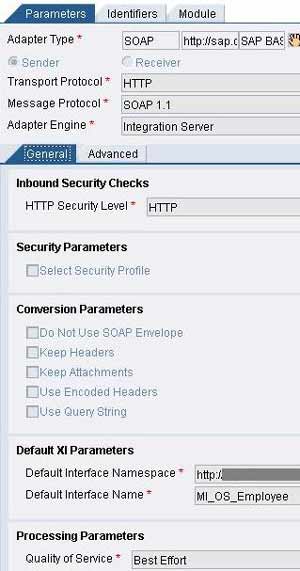
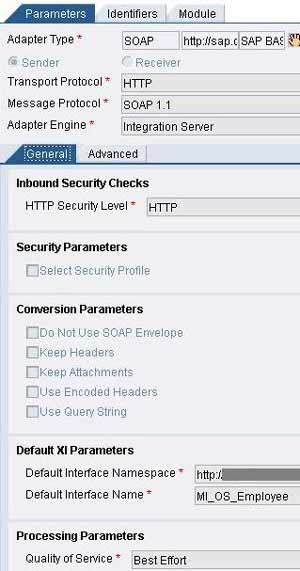
The figure on the right shows a typical configuration of SOAP sender adapter. Specify Transport protocol as HTTP and message protocol as SOAP 1.1. Specify the Security Level as required. Choose the conversion parameters if necessary. In Default XI Parameters provide the name and the namespace of outbound interface. Choose the quality of service. All the three QoS (namely BE, EO and EOIO) are supported.

SOAP Receiver Adapter Configuration
Let’s say you have some web service created on SAP ERP system. We will consume this web service in XI using SOAP Receiver Adapter. And then send a SOAP message to XI using SOAP Sender Adapter to test the scenario.

I assume that you have the URL of a web service that can be consumed. If not, you can easily create a web service by converting any RFC enabled function module into web service. Make use of web service creation wizard available under menu options in transactions like SE80/SE37. You can find the URL of the web service using transaction WSADMIN or by using Web Services Navigator.

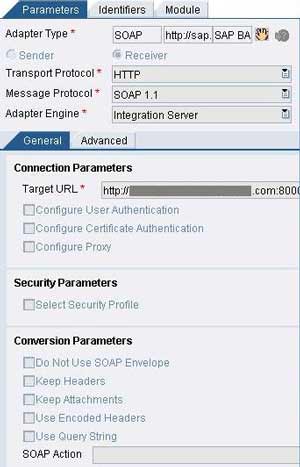
The figure on the left shows a typical configuration of SOAP receiver adapter. Specify Transport protocol as HTTP and message protocol as SOAP 1.1. Specify the Connection Parameters of the Web service. Target URL is the URL of the web service to be consumed.

Specify User Authentication if necessary. If the Web service provider requires proxy, check the Configure Proxy checkbox and specify host, post and authentication parameters as applicable. You can specify the Conversion Parameters as required.

Testing the SOAP Adapter

To test the SOAP sender adapter, you can create and send a SOAP message to XI at the web service URL by using any SOAP Client Test Tool. Some of the available tools are listed below –

If you have created the scenario using a synchronous outbound interface, you should receive a response back from XI. You can also see the messages in SXMB_MONI or SXI_MONITOR transactions. You may also want to check the message statuses in the adapter using adapter monitor and channel monitoring features in the Runtime Workbench.

You can then create an application to send data to XI via SOAP sender adapter. In one of the earlier articles I have described how to create a Web Dynpro application to send a SOAP message to XI. Another post describes the UI design aspects of the same.

This entry was posted in SAP, SAP XI / PI and tagged , . Bookmark the permalink. Post a comment or leave a trackback: Trackback URL.
Around the Web »»

61 Comments

  1. helmut klinger
    Posted June 10, 2008 at 7:45 pm | Permalink

    Yes, I could send a message to a Soap Adapter at XI .

    In (best effort) praxi one normally would have to
    - send the payload of the requestmessage somewhere,
    - generate a response message some how and
    - send it back to the the client.

    I am afraid, this will take some time to design – or is there a guide, examples etc.
    to accelereate development ?

    Thank You

    Helmut

  2. Posted June 11, 2008 at 9:53 am | Permalink

    Have a look at http://www.riyaz.net/?p=6. This example uses SOAP adapter to make a synchronous web service call.

  3. Posted July 18, 2008 at 3:44 pm | Permalink

    Hi Riyaz,
    I am vary thankful to ur valuable information.Its very excellent.And I want to know when this Web Service and Web Dynpro concepts we require to learn.Am beginner to Xi so please can u help me whn all those concepts need to learn.

  4. Posted July 18, 2008 at 3:59 pm | Permalink

    Hi Farooq,

    Web Dynpro is not required for learning XI. Knowledge of web services would be helpful. However, none of these is a prerequisite to learn XI.

    To understand XI, you should have an idea of XML. A background of SAP and Java is recommended but its not a showstopper.

    If you have just started learning XI, do go thru The XI Starter Kit and Your First XI Scenario.

    Regards,
    Riyaz

  5. AL
    Posted September 8, 2008 at 7:15 pm | Permalink

    Hi Riyaz,

    Could you tell me if it is possible to configure a Receiver SOAP adapter to use HTTP as a transport protocol with SMIME for message security?

    Would it work?

    Thanks,

    AL

  6. Posted September 9, 2008 at 1:14 pm | Permalink

    Hi AL,

    Under Security Parameters, select the chekcbox next to ‘Select Security Profile’. Then choose S/MIME as the Security Profile using the drop-down combo-box provided.

    Hope this helps.

    Regards,
    Riyaz

  7. Ritesh
    Posted September 20, 2008 at 4:20 am | Permalink

    Hi Riyaz,
    Can you please suggest good books for learning SAP XI?
    I’m a Java Developer with good knowledge about SOAP

    Thank you,

    -Ritesh

  8. Posted September 20, 2008 at 4:11 pm | Permalink

    Hi Ritesh,

    You can use help.sap.com. Thats a good way. You can pick up scenarios from riyaz.net as well. If you want to master IDocs theres a book by Michal Krawczyk titled ‘Mastering IDoc Business Scenarios with SAP XI’. You can also read ‘Mastering SAP XI Administration’ by Marcus Banner and Heinzpeter Klein.

    Regards,
    Riyaz

  9. Markus
    Posted October 22, 2008 at 2:11 pm | Permalink

    Hi Riyaz

    When I send a SOAP-message to XI with XMLSpy I am asked for username and password.
    Now a customer is developing a service to call my PI webservice and needs to know how he can submit username and password. Do you have any tipps? Is SHA1 supported with XI? If yes how can it be set up?

    Best regards
    Markus

  10. Posted October 22, 2008 at 3:03 pm | Permalink

    Hi Markus,

    You can create a service user with appropriate authorizations and provide the credentials(username/password) to your customer or the team working on the application which is to consume this web service.

    The application consuming this webservice has to supply these credentials when invoking a call to SAP XI. Logic would be specific to the application. e.g. If its a Siebel application, the username and password may be stored in a key store and retrieved by the application when required.

    Regards,
    Riyaz

  11. Markus
    Posted October 22, 2008 at 3:41 pm | Permalink

    Hi Riyaz

    Thanks for your fast reply. The user for consuming the webservice is already created and it works with XMLspy. When I submit the SOAP-message I am asked for username and password and then the websercie is being processed.

    What I need to know is, how username and password can be submitted with the customers external application, which is developed with Java.

    Can you help me?

    Regards
    Markus

  12. AL
    Posted October 24, 2008 at 8:52 pm | Permalink

    Hi Riyaz,

    Do you know if S/MIME requires any prior configuration?

    I still can’t get it to work.

    Thanks, rgds,

    AL

  13. Posted October 25, 2008 at 4:12 pm | Permalink

    Hi,

    I dont think S/MIME is supported in XI SOAP Adapter. You can use Web services security however. need to check abt S/MIME. I believe its supported only for RNIF adapters.

  14. illizi
    Posted November 18, 2008 at 7:18 pm | Permalink

    Hello all,

    Is het possible to use SOAP to send the IDOC and pdf as attachments?

    Best regards,

    Said

  15. Posted November 19, 2008 at 9:31 am | Permalink

    You can send any attachment with SOAP message. For IDoc, you may want to convert it to a file. You can also make use of available modules like PayloadSwapBean etc to swap the payload with attachment and MessageTransformBean to transform message headers/content types.

  16. joel trinidade
    Posted March 17, 2009 at 5:28 pm | Permalink

    Hi Riyaz,
    It was a surprise when i came across your website and the content on it. Its very good, informative and the arrangement and overall look and feel is very appealing.

    Keep up the good work man.

    Best wishes
    joel

  17. Akhil
    Posted March 19, 2009 at 9:00 pm | Permalink

    Hi Riyaz,

    Thanks for the wonderful information.

    I have a question for you. I hope you can help me with that.

    Q: How you would do a SOAP test from a runtime workbench

    Thanks

  18. Posted March 19, 2009 at 9:18 pm | Permalink

    You can try using the Test message tab for the Adapter engine in Component Monitoring section of runtime workbench.

  19. Posted April 3, 2009 at 2:33 am | Permalink

    Hi Riyaz,
    Can you please tell me how to use HTTPS protocol in PI 7.1. My Vendor prefer to receive files via HTTPS protocol. The requirement is I need to send Orders to Vendor via HTTPS protocol. What are the details I need to have to connect with my Vendor’s server. And please let me know the steps to setup the connectivity between my PI system and Vendor server.

    Thanks in advance for your reply.

  20. Lido Tarjan
    Posted April 16, 2009 at 11:56 pm | Permalink

    Hi Riyaz

    What should we do without you , Thanks and keep on the good work -)

    I have a little question and I hope to find the answer with you.

    I have webservice to File scenario , and I want to test it in real , not in runtime workbench, how can I do that ?.

    Thanks again.

  21. Malu mader
    Posted April 17, 2009 at 2:20 am | Permalink

    It is a good work

    Thanks

  22. Posted April 17, 2009 at 11:15 am | Permalink

    Thanks Malu and Lido!
    @Lido,
    You will need to consume the web service in a web application, say a web dynpro application and deploy it on a web server. You can then test your stuff in real-time. See this link, might be useful.

  23. Lido Tarjan
    Posted April 17, 2009 at 7:26 pm | Permalink

    Hi Riyaz.

    The webservice is asyn. can I still use the same methode

    I tried to test it with XML spy but it says no sender found, everything seem to be correct.

    regards.

  24. Posted April 17, 2009 at 9:08 pm | Permalink

    You can very much use the same method. Define an asynchronous interface/scenario in PI and create a webservice for that interface. You can use the generated WSDL to create an application using which you can send data to PI. it should as well work with XMLSpy.

  25. Ravi
    Posted May 12, 2009 at 4:12 pm | Permalink

    Hi,

    First of all thanks for PI contribution here, It will help us a lot.

    I have few questions for you on sap-PI & peoplsoft integration.
    In my company , we are planning to integrate SAP PI system with People soft
    to send back &forth between the systems. But we don’t have any IWay Adapter.

    1) Please let me know the best way to approach this.
    2) Give me few steps for dis if you have any.

    Thanks In Advance,
    Ravi.

  26. Nirupam
    Posted June 18, 2009 at 3:32 pm | Permalink

    Hi Riyaz,

    I need to connect a 3rd party vendor API via https protocol from PI 7.1.
    How can I do that? I could not find any way out, even tried with RFC destination, didnot work properly

  27. Posted June 20, 2009 at 11:59 pm | Permalink

    Havent tried this…need to check

  28. Riaz
    Posted August 5, 2009 at 3:50 pm | Permalink

    Hi Riyaz. Awesome site, its very informative keep up the good work. I have a question about the Sender SOAP Adapter – is it possible to set it up without authentication? So far i have not been able to do this. I’ve messed around with the config in the channel but i think this type of setting might be somewhere else. Thanks

  29. kayan
    Posted August 5, 2009 at 7:09 pm | Permalink

    Hi Riaz,
    Using SAP Erecruit/Jobboardintegration I am working on integrating a 3rd party vendor to post some information in their website.
    They have provided user ID/password – if we go via website (IE doesn’t work / Firefox works) and manually populate the data it works.
    But when I am trying to integrate it through PI 7.1 it is not working.
    I tried all the following options-, in PI it comes up with Successful status when I use SOAP adapeter, but practically data fails to reach the 3rd party website.
    * SOAP Adapter – uploaded vendor wsdl file created new interface using standard SAP interface created mapping , hardcoded the ID / PAssword against the corresponding field/ also used UID/password in user authentication level
    * HTTP Adapter – using Addressing type – URL – path prefix / authentication data and also Addressing type HTTP – and RFC destination.
    Nothing worked.

    Would really appreciate if you can let me know what is the best way of doing it.

    Regards,
    Kayan

  30. Ank
    Posted September 8, 2009 at 12:55 pm | Permalink

    Hi Riyaz,

    In a scenario with SOAP Sender, PI is sent back an acknowledgment. However the acknowledgment contains several tags pertaining to some checks and state from the receiving legacy system. PI treats the acknowledgment as a failure message because the BODY is not blank. Is it required to have the BODY part of an acknowledgment to be initial for PI to understand it as a success?

    Thanks !

  31. Posted September 8, 2009 at 1:29 pm | Permalink

    You need to find out whether SOAP adapter supports application level acknowledgements. I think it supports only system acknowledgements.

  32. Posted September 8, 2009 at 1:39 pm | Permalink

    Alternatively, you can setup a common (separate) scenario to send the application acknowledgements back.

  33. JVILLOT
    Posted October 13, 2009 at 1:42 pm | Permalink

    Hi all, how goes all?
    I’, trying to process 3 files using XI/PI. Well, the process is: An enterprise put in a system 3 type of different files. The problem is that they can be Invoice, Orders and DesAdv, and all of them has the same name always.
    The solution could be easy if the file name changes, but it’s something impossible now. Then i should read and process these files according with the data inside, in 3 differents interfaces.

    How can i differentiate them?

    Thanks a lot mates.

  34. Posted October 13, 2009 at 9:44 pm | Permalink

    Hi JVILLOT,

    You can try two methods:

    1) Read the entire source file line by line in a single XML tag (say <row>) using content-conversion. This will be common for all the 3 files. Use Java mapping to read content from row tags and generate original xml. You can then split the process into three routes using BPM.

    OR

    2) Use a simple adapter module that reads the source XML file and changes the filename depending on the xml content. In the adapter module, you can read original filename from dynamic configuration using message.getMessageProperty() method and change it to Invoice_<original_name>, Orders_<original_name> etc. Write the new filename back to Dynamic Configuration using message.setMessageProperty() method. Now use a receiver file adapter to write the file back to the same location. Select ASMA in advanced properties and select File Name checkbox in the receiver adapter. No ESR development is required for this. You can use dummy (non-existent) interface names.

    Now you can create 3 separate scenarios with 3 file adapters to read the files.

  35. JVILLOT
    Posted October 13, 2009 at 9:50 pm | Permalink

    Well, thanks! but maybe it can be quite difficult, what do u think about this other solution?

    Sample1:
    If you create a generic message type which can contain all kind of fields.
    If source file contains a invoic information then orders and desadv must be optionals.
    If source file contains a desadv information then invoic and orders must be optionals.
    If source file contains a orders information then invoic and desadv must be optionals.

    After that, split each message in the corresponding interface (invoic/desadv/orders) in your interface determination.
    Use key fields to verify if generic message can be a invoic or desadv or order in target side.
    You must differentiate each different format, from some key field. For example, if you have a NumberInvoic in your source file, you must put that in your interface determination :

    inbound interface –> invoic.invoic02
    Inbound namespace –> urn:sap-com:document:sap:idoc:messages
    condition –> field NumberInvoic EX
    Interface mapping –> your interface mapping, if needed.

    And with the other one formats, you must choose another key field and another condition.

    But the problem is that i have now the 3 idocs, but if i join all structures, the Data Type structure is going to be gigant. Do u know if only reading the header it could run?
    The first or second line of any idoc-XML has the most important data, the idocType field, but i don’t know if it’s going to be possible doing a split before the mapping.

    Thanks in advance!!

  36. Posted October 13, 2009 at 10:55 pm | Permalink

    Hi,

    I would not recommend combining three IDocs into one message structure. It would be lot confusing. If you want to create a generic message type, better put the entire file content into a single XML tag say <MyMessage><Payload>Your file content here</Payload></MyMessage> and then remove the wrapper around the message may be via Java or XSLT mapping.

    Adapter module would be lot easier to develop. It would take less than a day to put it in place. Predefined templates and how to guides are available on sdn.sap.com. In your case you wont need to write more than 10-15 lines of code to change the filename. Just check the xml tag that can identify the type of message and rename the file with methods I mentioned earlier. Let me know if you need more help on this.

    Alternatively, give this a thought bit further:

    Create a BPM with three receive steps. All three should be optional and processing should start as soon as one of the message is received.

  37. Posted October 14, 2009 at 10:55 am | Permalink

    Hi JVILLOT,

    I guess approach suggested by you should work as well. You can make use of XPATH in Interface determination to identify key fields.

    Use XML editor like Altova XMLSpy to combine the three structures and import the message as xsd file so you wont have to create datatypes.

    Further, in each of the three mappings, you can first use XSLT mapping to remove unwanted portion of the combined message and then call your mapping program.

    Do let me know if it helps.

  38. JVILLOT
    Posted October 14, 2009 at 12:56 pm | Permalink

    Hi, good morning!

    OK, songs good, your last message could be a road, i’ll start searching the program and trying to understand all, my last option is the BPM, maybe could be quite slow.

    Thanks a lot, you rock.

  39. JVILLOT
    Posted October 14, 2009 at 2:34 pm | Permalink

    one question, i haven’t used this editor before. I have it now installed in my computer, could you tell me how can i combine these 3 files?

    Cheers.

  40. JVILLOT
    Posted October 14, 2009 at 3:50 pm | Permalink

    The structures of the idocs are *.XSD standard of SAP.
    Can i combine them? What’s the steps to follow? maybe the final XSD is going to be too bigger, or not? i don’t know exactly how is it going to be, but to start, it songs very good, i’m trying to understand the xmlspy.

    Thanks.

  41. Posted October 14, 2009 at 5:28 pm | Permalink

    Hi,

    Just take the three XML files and organize them in a single XML file. You can simply copy-paste the root nodes into new XML file’s root node. Then choose the menu option DTD/Schema –> Generate DTD/Schema. In the dialog box choose W3C Schema. Click OK and save the file as .XSD. You can then import this XSD in PI.

  42. JVILLOT
    Posted October 14, 2009 at 6:00 pm | Permalink

    Ok, that helps, but my files are the XSD exported. one INVOIC.INVOIC02.xsd, the ORDERS.ORDERS05.xsd and DESADV.DESADV01.xsd. Then, can’t i do these steps with the XSD files too? i have been trying it and when i import the final xsd, XI generates an error.

    Thanks and regards.

  43. JVILLOT
    Posted October 14, 2009 at 9:36 pm | Permalink

    Well, after a lot of tests i have the problem that i have the same field several times in the same file, for example: field WERKS and it breaks the process. How can i create a unique structure? i have taken the xml files from the mapping test, i have the 3 idocs completly in XML format, added in the same structure, but when i try to convert in .xsd is when it fails.

    Sorry for all that questions, but you are very helpful whit this problem.

    Thanks and regards in advance.

  44. Posted October 14, 2009 at 11:46 pm | Permalink

    What you could do is create a unique root tag. For example create something like this:

    <?xml version=”1.0″ encoding=”UTF-8″?>
    <MultiMessage>
    <InvoiceData>Your INVOIC02 IDoc XML here</InvoiceData>
    <OrdersData><IDOC>…ORDERS05..</IDOC></OrdersData>
    <ShipmentAdvData><IDOC>…DESADV01..</IDOC></ShipmentAdvData>
    </MultiMessage>

    Then convert this xml into XSD. Please feel free to ask if you need more help. My pleasure to help out if I can.

    Riyaz

  45. JVILLOT
    Posted October 15, 2009 at 12:52 pm | Permalink

    Hi mate,

    Yes, could be a good idea, the reason of all that rounds is because ‘stearling’ can’t rename our diffrerent idocs, and we must process the idoc in one chance, without renaming or moving to a new folder for process. Then we thought to request a change in the entry structure and in this case we could create a unique source structure. But i guess that this new idea is interesting. If i have understood correctly, i should nest the 3 idocs inside an own structure inside the main structure called MultiMesage? i konw that it’s a sample, but i’m not sure about if arrives an idoc…this is going to fix with this structure.

    Thanks a lot!

  46. JVILLOT
    Posted October 15, 2009 at 1:20 pm | Permalink

    Ok, forguet all the last questions. After a discussion with the client, he doesn’t accept this, because if they want to add new idocs in the future, they should modify the structure and test all the idocs again, and the possible solution is something that i don’t know if is real….

    Can i split in the mapping the 3 types of idocs? using an individual SOAP adapter for idoc. Do u know if is possible do it from the mapping and split or separate it?

    Any new idea? i’ll try to investigate this new position.

    Regards.

  47. JVILLOT
    Posted October 15, 2009 at 2:15 pm | Permalink

    I don’t know if using an Abap Mapping can split every idoc to his corresponding communication channel…..

  48. JVILLOT
    Posted October 15, 2009 at 3:28 pm | Permalink

    Dear guru….is it possible to connect a SOAP sender to SOAP receiver?

    Regards!!

  49. JVILLOT
    Posted October 15, 2009 at 8:54 pm | Permalink

    Solved!

    I’ll try to xplain it to u later, with the last question i have found the solution. without mapping and only with the SOAP way.

  50. Posted October 15, 2009 at 9:49 pm | Permalink

    Good to know :)

    When you get time, do let us know the solution that worked. All the best!

  51. Prasanna Kumar
    Posted October 26, 2009 at 10:59 am | Permalink

    Dear Riyaz,
    PI needs to post data to webservice and if for a particular field, there is no value coming from the source structure, then PI needs to post in the following way:

    Now this attribute(nil=”true”) is currently not specified in the wsdl. The webservice team says that it is part of the XML Schema standard which is the standard used by SOAP messages and so PI should automatically put the attribute value as nil=”true” whenever the value is not present.

    Do you know how this can be achieved?

  52. Posted October 26, 2009 at 11:03 am | Permalink

    Hi Prasanna,

    If the attribute is not automatically generated by PI, you can manually provide mapping for the attribute in your mapping program.

  53. Prasanna Kumar
    Posted October 27, 2009 at 11:32 am | Permalink

    Hi Riyaz,

    Thanks for your Quick response.

    Well I am trying to find out the standard way instead of manual setting of attributes(as it is the XSD standard PI should also have the capability of the same).

    Is there any setting ( Adapter Module) so that PI will automatically take care of this.

  54. Sandhya
    Posted December 17, 2009 at 11:50 am | Permalink

    Hi Riyaz,

    I am working in SAP Environment and is willing to shift in development,as i am having experience in Java & J2EE development exp. But now presently i am not in development working,Is it good for me do XI (Exchange Infrastructure) course. So that i will get good job in development in XI or i have to first do the ABAP & then XI course.

    Is there good market for XI right now.
    Please guide me for the situation.

    Also if I do decide to do XI then ,please provide me so good books name . sites name that will be useful for me.

    Thank you.
    Sandhya.

  55. JVILLOT
    Posted December 17, 2009 at 5:26 pm | Permalink

    Hi Sandhya,

    I guess that it’s important to know abap firstly. Maybe is good combine both environments, but XI is inside Netweaver,so it’s going to be the future of SAP.

    Good luck!

  56. SAPPI
    Posted March 4, 2010 at 5:38 pm | Permalink

    Hi experts:

    I’ve a difficult issue:

    I want to send a SOAP message to a thirdparty environment ,this environment requieres a special format of the message; i’ll put a sample:

    name
    x.0

    …………..

    This is the meesage that i process with PI. Then when it arrives to the other environment should be as this one:

    &lt ;inputMessage>
    &lt ;request>name</request>
    &lt ;versionMsg>x.0</versionMsg>
    etc etc etc…….”
    I know that is possible to escape the data whit the XI Payload Manipulation if u use a HTTP adapter, but this option doesn’t exist in SOAP adapter. Some one knows how to change these body fields in the SOAP envelope?
    Thanks in advance and best regards.

  57. SAPPI
    Posted March 4, 2010 at 5:45 pm | Permalink

    Hi experts:

    I’ve a difficult issue:

    I want to send a SOAP message to a thirdparty environment ,this environment requieres a special format of the message; i’ll put a sample:

    < SOAP:Body >
    < ns0:application xmlns:ns0=”http://xxxxxx/yyyyyyy.com/zzzz” >
    < in0>
    < inputMessage >
    < request>name </request >
    < versionMsg>x.0
    …………..
    < /parameters >
    < /inputMessage>

    This is the meesage that i process with PI. Then when it arrives to the other environment should be as this one:
    “< SOAP:Body >
    < ns0:application xmlns:ns0=”http://xxxxxx/yyyyyyy.com/zzzz”>
    < in0>
    &<inputMessage>
    &<request>name</request>
    &<versionMsg>x.0</versionMsg>
    etc etc etc…….”
    I know that is possible to escape the data whit the XI Payload Manipulation if u use a HTTP adapter, but this option doesn’t exist in SOAP adapter. Some one knows how to change these body fields in the SOAP envelope?
    Thanks in advance and best regards.

  58. PI
    Posted March 5, 2010 at 12:09 pm | Permalink

    Hi,

    Try using [CDATA] statements in your mapping. Google CDATA to find how to use it.

  59. SAPPI
    Posted March 5, 2010 at 4:41 pm | Permalink

    GREAT!! THANKS!

  60. PI_7.1
    Posted March 17, 2010 at 2:58 pm | Permalink

    Hi mates, i’ve a doubt. I want to change the content of the message after leave the adapter, well, not the adapter, the SOAP envelope. So, should i add it in the Module? where should i add the java class, in the IR and reference it in the ID adapter module?

    Someone knows the steps to be done?

    Thanks and regards.

  61. Posted March 17, 2010 at 3:52 pm | Permalink

    You need to create adapter module using NetWeaver Developer Studio and deploy it on your PI server. For step by step guide, have a look at: http://www.sdn.sap.com/irj/scn/index?rid=/library/uuid/c0b39e65-981e-2b10-1c9c-fc3f8e6747fa

One Trackback

  1. By Probar un Web Service « Tykall’s Weblog on October 15, 2008 at 5:37 pm

    [...] XI/PI: A Guide to Using SAP XI SOAP Adapter [...]

Post a Comment

Login with your Facebook or Twitter Account to comment. Alternatively, please fill in the fields marked *.

.

Connect with Facebook

*
*

You may use these HTML tags and attributes: <a href="" title=""> <abbr title=""> <acronym title=""> <b> <blockquote cite=""> <cite> <code> <del datetime=""> <em> <i> <q cite=""> <strike> <strong>

CommentLuv Enabled

Subscribe without commenting

GetSocial