XI/PI: Consuming XI Web Services using Web Dynpro – Part II

Part I of this article, explains how to create a brokered web service in XI 3.0. In this part, I will describe how to consume this web service in a Web Dynpro Application.

Scenario:

  • User requests Customer Details via a Web browser
  • Data is sent through WebAS to XI using a SOAP adapter
  • The message is then synchronously sent to SAP R/3 system via RFC adapter, and a BAPI call is executed to get the Customer details
  • The BAPI response is sent to the WebAS to fulfil the user request

In Part I of this article I described how to define web services in XI. In this part, I will focus on using the generated WSDL file to expose the web service using a Web Dynpro application

Prerequisites:

  • Good knowledge of XI 3.0 concepts
  • Basic knowledge of Web Dynpro Applications

Steps:

  • Create a Web Service Model by importing the XI generated WSDL file
  • Design a Web Dynpro Application
  • Deploy the application on WebAS

Create a Web Service Model

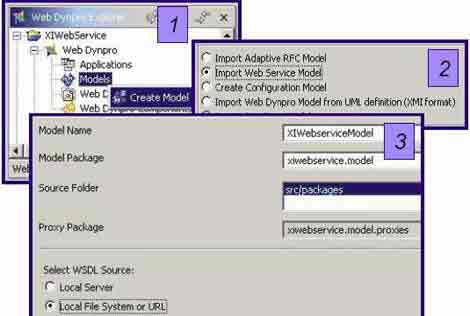
1. Create a new Web Dynpro project in NetWeaver Developer Studio. Expand Web Dynpro node and right click on Models to Create Model
image

2. Choose to Import Web Service Model and click Next >

3. Specify a model name and a package. Select WSDL source as Local File System or URL since our WSDL file is saved on the local desktop

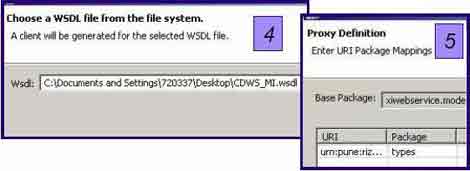
4. Specify the source of WSDL File and click Next >

5. Click Finish to close the Wizard
image

Views and Navigation Schema

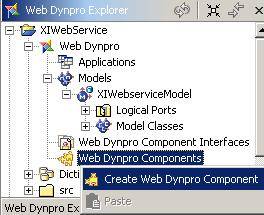
1. Create a Web Dynpro Component
image

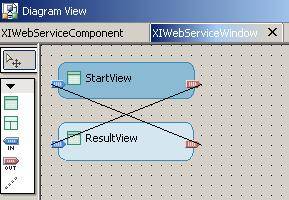
2. Create two views: StartView and ResultView. You need to embed these views in a window. For this, you can use the context menu for the window created under the component.

3. Create inbound and outbound Fireplugs using the context menu for both the embedded vievs.

4. Specify the navigation schema using the Create a navigation link button on the left hand side toolbar as shown below:
image

Add the Web Service Model

1. Open the component by double-clicking on it

2. In the Used Models area, right-click and choose Add Existing Model. Select the Web Service model imported previously.
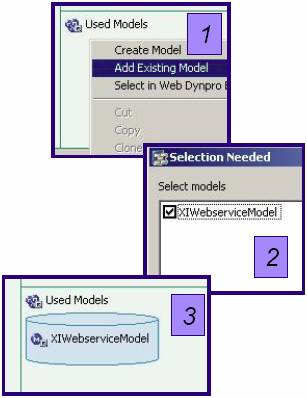
image

3. The model now appears in the Used Models area.

Define Model Binding

1. Right click on Component Controller and choose Apply Template

2. Select the Service Controller and click Next >
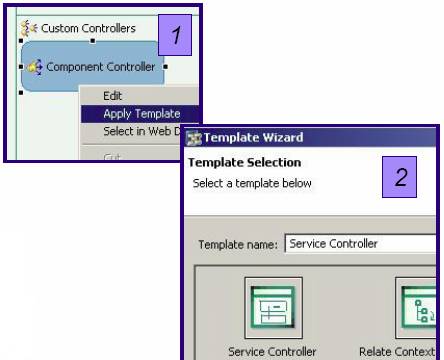
image

3. Select the Model class for the Model Binding and click Next >
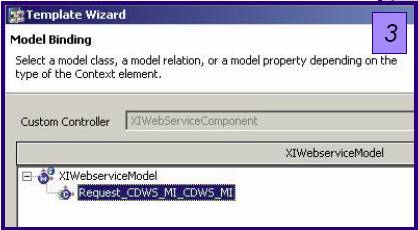
image

4. Select the Context Elements you want to bind and click Next >

5. Accept the proposed method name and click Finish to generate the method
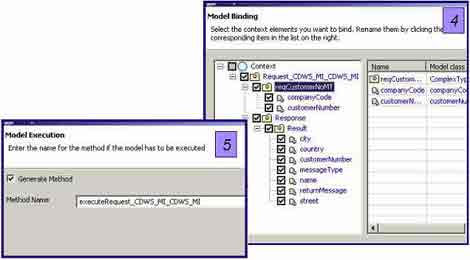
image

Define Context Mapping

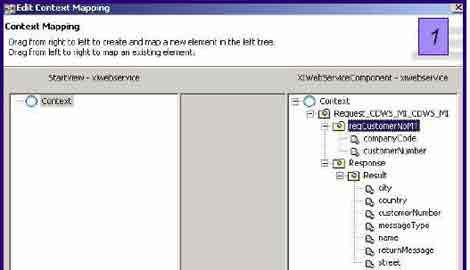
1. Open the component by double-clicking on it. In the left hand side toolbar, choose Create a data link. Join the StartView and Component Controller. Drag reqCustomerNoMT folder from right hand side to the left hand side. Another wizard window appears.
image

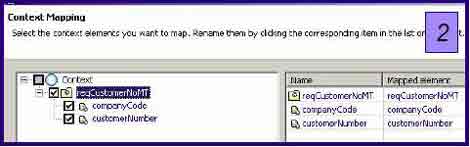
2. Select the fields for context mapping. Click OK and then click Finish.
image

3. Similarly join ResultView and Component Controller using fields from Response folder

User Interface Design

Create the necessary User Interface elements for both the Request and Response Messages and the Action Methods. An example is shown below:
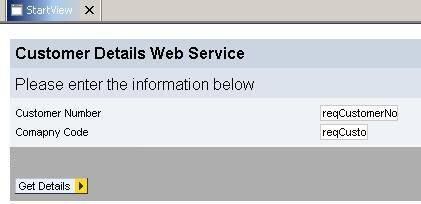
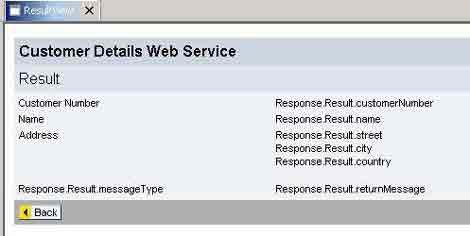
image

image

Note:

XI does not accept unauthenticated requests. Hence, you have to pass the logon credentials along with the request. For this add following lines of code in the executeRequest_CDWS_MI_CDWS_MI( ) method implementation of the Component Controller:

wdContext.currentRequest_CDWS_MI_CDWS_MIElement().modelObject()
._setUser(“username");
wdContext.currentRequest_CDWS_MI_CDWS_MIElement().modelObject()
._setPassword(“password");

Create and Run the Application

Finally, create an application for the component, build the project and deploy the application on WebAS. Sample execution of the application is shown in the figure below:
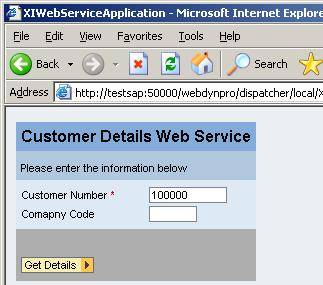
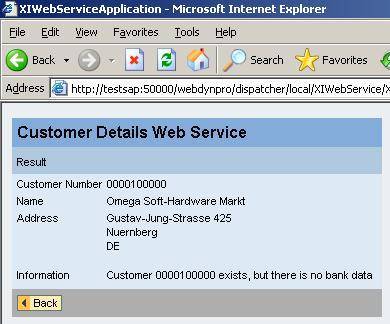
image

image

There are various ways of consuming the web services created via XI. I have just described one of the ways. In the scenario discussed here, XI acts as an intermediary (as a broker) between the Web Application and SAP R/3. Such web services are called as Brokered Web Services.

This entry was posted in SAP, SAP XI / PI and tagged , , , . Bookmark the permalink. Post a comment or leave a trackback: Trackback URL.
Around the Web »»

21 Comments

  1. Vin
    Posted January 8, 2008 at 5:14 pm | Permalink

    Hi,
    Good article!

    Is it possible to achieve this using Web Dynpro for ABAP?

    Thanks,
    Vin

  2. Posted January 9, 2008 at 9:33 am | Permalink

    Hi Vin,

    It is very much possible to achieve this using Web Dynpro for ABAP, although the procedure will differ slightly. As I stated in Part I of this article series, XI only generates WSDL file. We can consume the web service in any type of web application. Any tool (say Web Dynpro, Microsoft .NET, Web Dynpro for ABAP) that supports importing web service definitions (WSDLs) to create web applications can be used to consume and make the web service available.

    Regards,
    Riyaz

  3. Vivek
    Posted June 6, 2008 at 1:04 pm | Permalink

    Very helpful article.

    Thanks,
    Vivek

  4. Divya
    Posted June 11, 2008 at 3:01 pm | Permalink

    Very Good Article…very helpful

  5. Kev
    Posted June 11, 2008 at 11:19 pm | Permalink

    Nice article. I found it because I was looking for how to set the username and password for a web service requiring authorization. I saw the part about _setUser and _setPassword, but in my DeveloperStudio the wdContext…..modelObject() doesn’t have a _setUser or _setPassword method, only _setAttribute(QName, Object) and _setField(QName, Object). Have I done something wrong?

  6. Kev
    Posted June 11, 2008 at 11:21 pm | Permalink

    Nice Article. I found it because I was trying to find out how to send username and password to a web service requiring authorization. Problem is, the modelObject() returned to me from wdContext..etc.. doesn’t have _setUser and _setPassword methods, only _setAttribute and _setField. Have I done something wrong? Using NetWeaver 2004s.

    The web service isn’t an XI service, but that shouldn’t affect my client code.

  7. Posted June 12, 2008 at 9:31 am | Permalink

    I believe there are better means of passing credentials for authentication. In this article I have hard-coded the username and password. But in real-time, you may want to validate them against a database…may be in the similar way as SSO authentication does in EP. I dont have much idea as to how this could be achieved, you may want to consult an EP consultant who would be able to assist you better.

  8. Chinna
    Posted June 26, 2008 at 8:54 pm | Permalink

    Hi Riyaz,

    Its nice article. You articles are giving more confedence to the beginers. Nice going. Thanking you a lot..

  9. sankara rao bhatta
    Posted July 9, 2008 at 11:19 am | Permalink

    Hi

    you said you can do the same thing using ABAP webdynpro. can you give me the steps for that. I could not find how to import the WSDL file in case of ABAP webdynpro.

    thanks
    sankar

  10. Posted July 9, 2008 at 12:57 pm | Permalink

    Hi Sankar,

    Check out this blog article by Thomas Jung. See the Release 640 section, the later half of the article where he has explained the step-by-step procedure of consuming SOAP based web services in Web Dynpro ABAP.

    Hope this helps.

    Regards,
    Riyaz

  11. sankara rao bhatta
    Posted July 15, 2008 at 2:29 pm | Permalink

    Thank you very much Riyaz

  12. sankara rao bhatta
    Posted August 5, 2008 at 4:28 pm | Permalink

    Hi

    In the SDn blog you have referenced ( https://www.sdn.sap.com/irj/sdn/weblogs?blog=/pub/wlg/1012 ) the author uses a public webservice, but when we create a webservice in XI we will have different format of the url like below
    http://:/XISOAPAdapter/MessageServlet? channel=::

    Can we use this url stright away or do we need to change anything??

    thanks
    sankar

  13. Posted August 5, 2008 at 4:38 pm | Permalink

    Hi Sankar,

    You can save the WSDL created in ID on your local machine. Then choose Local File option when you are prompted to specify WSDL source. Alternatively, you also have option of using XI repository as WSDL source.

    Regards,
    Riyaz

  14. sankara rao bhatta
    Posted August 12, 2008 at 4:06 pm | Permalink

    Hi

    I have genrated a WSDL file from webservice to RFC scenario in XI
    I am trying to use thislocal wsdl file as you suugested in creating a client proxy in SE80 transaction. But when we create the logical port LSCONFIG transaction we need to enter some parameters in “call parameters” tab.

    In case of URL we can enter URL where the WSDL file is located, but in our case where we are using the local WSDL file what we need to enter.

    thanks
    sankar

  15. Lakshmi Prasad
    Posted March 24, 2009 at 8:00 pm | Permalink

    Hi,

    I given local system path for wsdl file, But I am getting following error.
    FileNotFoundException.

    Regards,
    Prasad.

  16. Subhendu Sahu
    Posted April 7, 2009 at 9:18 pm | Permalink

    Hi Riaz,

    We have to give the authentication (user ID and password) to the client who consume the webservice. But we cant assign the ID all the roles. Can you please tell me, what the exact roles we should assign for such ID ?

    Regards,
    Subhendu

  17. Phani
    Posted April 8, 2009 at 5:34 pm | Permalink

    Hi,

    To know about the authorizations and roles to be asigned to any id, check the link below.

    http://www.erpgenie.com/sap/netweaver/xi/xiauthorizations.htm

    Regards,
    Phani

  18. Diego Crespo
    Posted May 20, 2009 at 2:35 am | Permalink

    Hi Ryaz,

    I have the NWDS installed on my local computer, but I can´t use it.
    There are no kind of project type, none libraries, it seem that the NWDS is empty, “Blank”.

    Where Can i find something saying more about the NWDS, how to install ? What Do I miss to my NWDS works ? Do you have some articles to tell me ?

    Thanks a ton for your help!
    Diego Crespo

  19. Posted May 20, 2009 at 2:39 pm | Permalink

    Have you installed the correct version of JDK that corresponds to your NWDS version? If not please install the right JDK/JRE and then reinstall NWDS. In my opinion, only correct version of JDK is the prerequisite for NWDS.

    Also, in order to be able to deploy your application, you need to add the hostname/port of your SAP WAS to NWDS config options.

  20. Rajat
    Posted November 4, 2009 at 1:33 pm | Permalink

    Hi Riyaz,

    I wish to consume a third party web service using NWDS 7.1. How can I do that?

    Also I want to test the same in WS Navigator. How can I do the same?

    Thanks.
    Rajat

  21. Posted November 6, 2009 at 1:59 pm | Permalink

    Hi Rajat,

    I guess the process would be simlar to the one explained in this article. You can import the WSDL in NWDS 7.1 and bulid your application around it. Web services deployed on SAP Web AS can be tested using WS navigator.

2 Trackbacks

  1. [...] Home   |    Blog   |    Forums   |    Art Gallery   |    Philately   |    Contact Us    Previous article Next article [...]

  2. [...] Philately   |    Contact Us    Previous article Next [...]

Post a Comment

Login with your Facebook or Twitter Account to comment. Alternatively, please fill in the fields marked *.

.

Connect with Facebook

*
*

You may use these HTML tags and attributes: <a href="" title=""> <abbr title=""> <acronym title=""> <b> <blockquote cite=""> <cite> <code> <del datetime=""> <em> <i> <q cite=""> <strike> <strong>

CommentLuv Enabled

Subscribe without commenting

GetSocial