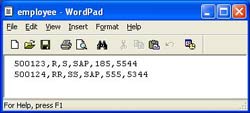
We have discussed the simple File Adapter Configuration earlier. In this article we will understand the concept of File Content Conversion using an example of comma separated text file as source. File Content Conversion helps in converting the file formats to/from XML.
We need to simply define the structure of the source or target file so that the adapter can accordingly convert it to/from XML.
File Sender Adapter with Content Conversion
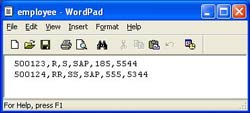 Let’s say we have a simple CSV (Comma-separated values) file something like the one shown in the adjacent figure. It contains employee details. The same needs to be sent to XI via sender file adapter.
Figure below shows a typical configuration for the sender adapter. Document Name and namespace indicate the message type used (from the Integration Repository). Recordset Name specifies the name of the root node that should be created while generating the corresponding XML. This should be in sync with the message structure in the Integration Repository. If you don’t specify this, XI creates a default root node called Recordset.
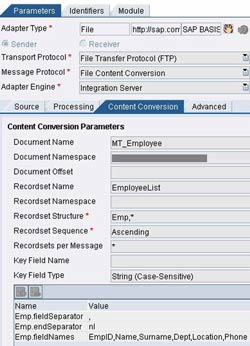 In Recordset Structure you specify the substructure and its occurrence. In our case ‘Emp,*’ indicates that node Emp can occur any number of times within the root node.
Three mandatory parameters that must be provided are –
- <node>.fieldSeparator – can be a comma for a CSV file, or any other separator. You can specify the hex code here, e.g. for a tab separated file you could provide ‘0x09’ (including quotes).
- <node> .endSeparator – signifies the end of a record, ‘nl’ (including quotes) indicates a new line character.
- <node> .fieldNames – list of field names in each record.
For an exhaustive list of parameters available for recordset structure please go through this link. You can find detailed description of File Sender Adapter parameters here.
File Receiver Adapter with Content Conversion
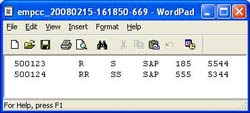 Assume you have XML content as generated by the sender adapter above and are required to generate a tab separated file (as shown in adjoining figure) at the receiver end. File Content Conversion comes in handy here.
Specify the Recordset Structure giving the list of nodes including the root and substructure that needs to be read.
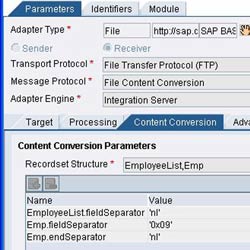 The mandatory parameters are – <node>.fieldSeparator and <node>.endSeparator. Description is same as in sender adapter. Please see the figure on the right to have a clear understanding.
For an exhaustive list of parameters available for recordset structure, please visit this link. You can find detailed description of Receiver File Adapter here.
In the next part we will see configuring file adapter when dealing with files with complex structures.
