We have earlier discussed how to configure receiver mail adapter to be able to send emails from SAP XI. In this article, let us understand the configuration of Sender Mail Adapter. Sender Mail Adapter is used to collect emails from an email server and convert them to XML messages so as to process them in XI Integration Engine.
 Configuring the Sender Mail Adapter
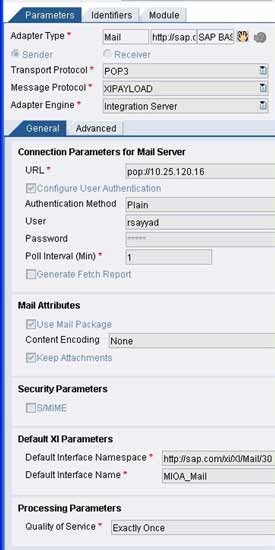
The adapter supports POP3 as well as IMAP4 protocols. You need to specify the connection parameters for the mail server. Specify the Mail server URLs depending upon the transport protocol (POP2 or IMPA4) in the format given below:
pop://EmailServer or imap://EmailServer/UserInbox
Select the ‘Use Mail package’ indicator if you want to receive the email along with header information (like sender, receiver, subject etc) as payload. If you don’t check this box, you will only receive email content as your payload. You can specify the content encoding as required. If you do not choose any, the message will be transferred as it is.
If you want to preserve the attachments, select the ‘Keep Attachments’ checkbox. All the three Quality of Service (BE, EO, EOIO) are supported. Specify QoS as per your scenario. Provide the name and namespace of the outbound interface from Integration Repository that should handle the further processing of the converted XML message and you are done.
Specify the poll interval i.e. the time interval between two attempts by XI to check for any new messages. Once active, the adapter will start polling the Email Server. The adjoining figure shows a typical configuration of Sender Mail Adapter.
Say your email inbox receives an email shown below.
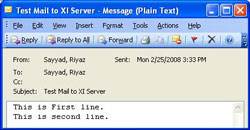
Once XI polls the server, the email will be picked up and processed by the adapter engine. The figure below shows the resulting XML payload after processing by the adapter engine.
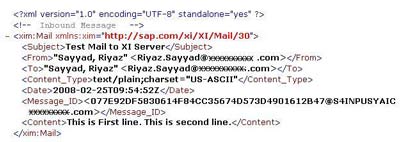
Thus, we are done with configuration of sender mail adapter. If the email is received in rich-text or HTML format the same is sent in the form of a SOAP attachment along with the message payload. We can see this using transaction SXMB_MONI or SXI_MONITOR.
Also Read:
