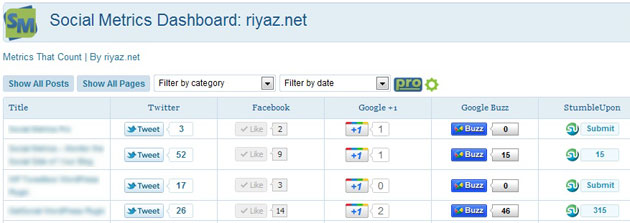
Social Metrics – Monitor the Social Side of Your Blog
Comments
-
Hi Riyaz,
Nice plugin, but i cant access to settings page, however im an admin, superadmin on my site. it says on admin.php?page=socialmetrics_settings: “You do not have sufficient permissions to access this page.”
-
Great plugin.. Seems that after Digg did their “Redo” of their site, the Digg column doesn’t work anymore. Any chances this will be fixed soon?
-
Dear sir, i have a question about this plugin, does it notifies when every a post gets share or like
i just saw the plugin today & i have installed the free one to my blog but i see no notifications about the new share ?-
It doesn’t notify you of new shares. What it does is shows all your shares in on location. It’s nice to be able to look at posts side by side and see which ones perform better.
-
-
Hello,
I am unable to change any of the settings – is this deliberate? I’m guessing that it’s a pro feature, but it is not made clear.
Cheers,
Tom
-
The free version is a light, unoptimized version and most settings are unavailable. You may want to try out the pro version here – http://socialmetricspro.com. It comes with 7-days trial offer.
-
-
Hi,
very nice plugin. There is an issue with the Facebook column. It is to narrow with german language. You only see the beginning of the small count box, not the number.Chris
-
Thanks riyaz for sharing nice plugin. Now I can see how many social media buzz I have.
-
First off great plugin! I have one question though. I noticed that not all of my pages are showing up in the Social Metrics view with wordpress. I see most of them but I specifically dont see my “Music” linked pages. For example this page http://allenmorganaudio.com/albums/lauri-ylonen-new-world-remixes/ has 2 likes and it doesnt show up in the social metrics view in wordpress. Any clues you could give me so I can also see these pages?
Thanks Again and wonderful job!
Allen-
Allen, If these pages are custom post types instead of standard posts or pages, the free version of Social Metrics wont pick it up.
-
-
Hi, love the plug in but I have updated my plug in and I don’t think it is counting LinkedIn correctly. It says 184 for each one of them. That cannot be correct. Please let me know if there is something I can do to get a more accurate count. THANKS!
-
Great plugin but I don’t think its working 100% properly on my WP 3.2.1. On a brand new blog it is showing inShare as 42 on all pages/posts.
-
Installed the plugin and right afterwards got my jetpack based site stats crashed.
Also, when I try to search for a new plugin I get this message: “An Unexpected HTTP Error occurred during the API request”.Any idea?
-
Looks like your plugin operations (multiple connections to external servers for each social network, for each post in a very short amount of time) triggered the server’s firewall into blocking access of outgoing connections. Thus rendering out of service all WP.com based services (akismet, stats, plugin servers etc).
You may want to implement some sort of workaround for this issue and put up a warning for your users about this potential issue. All hosting companies serious about security will have such rules implemented.
-
-
When I look at the little flags (like the number of tweets, for example) and hover over the number, it says that that is the amount of times the link has been retweeted. When I click on it, however, it brings me to Twitter and says that it can’t find any tweets. It seems that the flag is indicating the number of times the “tweet” button has been clicked, but not the number of times the link has actually been shared. Can you help me figure this out?
-
I went with the Pro option and the concept is great, but the metrics are frequently incredibly far off from the various sites official numbers, which pretty much makes it worthless.
-
Both Social Metrics and the Pro version indeed report the official numbers pulled from respective social networks. I would love to know which metrics are you referring to and what did you find different from official numbers. If you have purchased Pro version, please write to the support team about your issue and we would be more than happy to help you.
-
-
I may be missing something, but I am the site admin and I don’t see a “Settings” under the plugins. I see the Social Metrics under the dashboard but I can’t find how to edit the settings for the plugin. Thanks.
-
Hi, a nice plugin.
A quick question : for LinkedIn, each line shows a value 1, although I don’t share most of my posts to this platform.
I tried to share one, the value turned to “2″, then refreshed the page and it was back to 1.
Seems broken, huh ?
Sincerely
DJM -
Wow, really usefull plugin! Thanks for the good job.
-
The major issue I am facing is that i seem to have lost all my backlinks from facebook and twitter..this is effecting my SEO..i am loosing rankings on google..can you please help?
-
Hey Riyaz..first off all thanks for the plugin..it is most useful.
However, recently there was an update to the plugin and after updating all my counters got reset to ZERO..should i be worried? Is there any way of getting them back to their actual values?
Thanks
-
recently purchased pro, thinking it would allow more services to be tracked? right now the huge one we’re missing is reddit. any plans to add that in the future?
thanks! love the plugin otherwise.
-
Just purchased the pro-version :)
Any plans on adding support for custom post types?
-
Nice one, great plugin.
-
Just a BIG thank you.
Your plugin is FANTASTIC
Now, FINALLY, no more running around on different sites to track my stats.
Sorry, for the BIG letters :-)
Jürgen -
In a website that relies more to the home/front page than any other page, I’ve added facebbok, twitter and google+ buttons, but they aren’t counted by this plugin: would be possible to also include the home/front page?
-
Fantastic wp plugin. Thanks for sharing.
-
Qual encurtador você utiliza?
-
Have a feature request. Would be cool if this same menu was brought into the edit screen for each post. So, when you go to edit that specific post, you could see the stats for it.
If you don’t get around to it, I might just make this plugin…
Thanks! Great plugin.
-
Whipped a little plugin. Here is a screengrab.
-
-
Hi!
I really like your plugin, but I’m missing a very useful feature.
It would be great if I had the possibility to sort the columns (Facebook, Twitter, …) ascending or descending according to the number of shares, tweets, and so on.
Then it would be very easy to see which posts are the most popular.Would this be possible for a future version?
Thanks!
-
Hey Riyaz. First of all thanks for the plugin. I recently started using it on my blog (blog.rizzif.com) and it does pretty much all I was looking for – saved me tons of time!
I have a couple of questions:
1~ The Social Metrics Dashboard show mostly 0 (zeroes) for my counters, whereas I know that -for instance- the Twitter counts should be at least at 1 (I use the “Twitter Tools” plugin http://crowdfavorite.com/wordpress/plugins/twitter-tools/ to auto-post to Twitter when a new post is published). For instance, this morning’s post ( http://blog.rizzif.com/2011/06/23/strutting-your-stuff/ ) should match this Tweet ( http://twitter.com/search?q=http%3A%2F%2Fblog.rizzif.com%2F2011%2F06%2F23%2Fstrutting-your-stuff%2F ), and in fact, when I click the counter (for Twitter) on the Social Metrics Dashboard, the correct tweet is displayed… but the Dashboard insists the twitter count to be zero…
Does this indicate a misconfiguration on my side?2~ Similarly, the counters displayed on each post are zero-ed (I suspect this to be due to whatever is going on with #1)
3~ I think the Facebook Like and Share buttons I have on each post are throwing errors (again, using today’s post as an example): Unsafe JavaScript attempt to access frame with URL http://edge.sharethis.com/ [...long URL..] from frame with URL http://blog.rizzif.com/2011/06/23/strutting-your-stuff/. Domains, protocols and ports must match.
Again, I suspect a misconfiguration on my side – any suggestion will be much appreciated.
Thanks in advance,
F -
Working great on 3.0, thanks for the work! Recommend.
Regards1
-
Hi
Congratulations for Social Metrics.
How it will be possible to have data for Facebook Share?Thank you
-
I just began using Social Metrics, and it seems to have problems with twitter, and instead of tweeting the title, it wants to tweet just part of it, and then < span class= then the shortened url… No clue why however.. it works fine with some posts, but not others… My post has a tweet button by SexyBookmarks and that plugin tweets just fine… so I dunno
-
Do you have any plans to allow for customization of what services are reported? I’m not concerned with Google Buzz for instance. Also, any plans (or ability) to report Facebook shares as well as likes? Thanks for the great plugin!
-
After activating and configuring the Plugin I get the error message (dashboard / social metrics):
Fatal error: Call to undefined function get_post_type_object()
-
Hi Riyaz, Nice plugin, I tried it and found very useful. I just posted an article on your plugin.
-
I have installed but dont see any icons for people to click within the indivual posts for people to either click to twitter or fb or digg about that partuicular entry … have I done something wrong or am I missing the point of this plugin?
-
I suppose that only new articles will get the metrics. Old ones will not be processed, correct? I am asking because I activated the plugin and I see nothing in the social metrics plugin panel…
Social Metrics is a Social Media Monitoring tool for your WordPress blog. You can use it to track your blog performance on popular social networking websites and services. Simply install the plugin and you can start monitoring your blog’s social media metrics.


Since the last 2 days Stumble Upon doesn’t work anymore
I actually was basically seeking for creative concepts for my own
web site and came across ur blog, “Social Metrics – Social Media Monitoring
Plugin for WordPress”, will you care in case I actually apply many of your own ideas?
Thank you ,Dennis
Points You Need To Know About Network Marketing
Look at the recommendations in the following paragraphs and find out how you
can become successful at online marketing.
You have to maintain typical meetings for your staff. It can
be helpful for the entire team whenever you all gather on a regular basis.
Create your multi-level marketing site like a training is to establish.
Offering obvious, which can improve the likelihood of enhancing your advertising and marketing functionality.
These both increase your system membership along with your advertising income.
If you’ve made the decision to begin a MLM endeavor, you should take into account the overall settlement bundle that may be available to you and which at any time you may have partnered or teamed on top of. When you find yourself certain of the total amount and volume of the payments as well as other positive aspects you could have coming to you, you will know whether you are spending your time smartly or needs to be open to additional options.
Maintain your events limited to one hour in size. When the multilevel marketing meeting will take very long, it will appear more difficult and time-eating for the potential.
Assess what you failed and use the info figured out to heart.
When you saw an ad that says you may “make hundreds per month within your extra time!!!, you simply will not achieve success. You will have to work incredibly tough at MLM if you want to become successful. Make a assurance which you will obtain the most work daily, and will also pave just how for any firm foundation in multi-levels advertising and marketing.
You ought to produce comprehensive goals for every part of your existing marketing strategy. This will motivate you some thing to strive for and drive you to keep going.
One way to evaluate your multiple-stage advertising and marketing can be as a angry dash to sign up the most contributors.
You need to understand just as much as it is possible to about your merchandise.
Take a look at impartial distributors to discover the best way to product oneself when you use multilevel marketing professionals are doing and study from their achievements.
You cant ever be sure who is enthusiastic about what you have to offer.
While you need to build a site for multi-level marketing, utilizing social network sites can actually get you started.An interesting and effectively published blog, regularly up-to-date website is a superb strategy to add, once you have an internet site and so are on social media internet sites. Your group improves with your on the web reputation in the interpersonal establishing.
We all love to obtain anything ideal for simply a deal!Look for network marketing business including coupons to share with your buyers. People could be more prone to consider an interest in your products or services in case they have a reduced price.
Prior to investing money into a advertising enterprise be sure to analysis all of them with the BBB. There are lots of legitimate businesses on the market, but there are several not too good ones at the same time. You have to guarantee that this expense is safe.
The guidelines in this post will help you to raise the effectiveness. Finally, your main goal is to bring in all the revenue as you possibly can. Ensure that you apply all of the information you possess been given in the following paragraphs, and drive you to ultimately achieve success.
Hi Riyas, I’ve just installed your social metrics free version 2.1. On my WordPress site http://www.ebirthdaywishesquotes.com the social media tabs are not initially displayed. What is the best way to correct this? I tried reinstalling the plugin but I’m only new at this.